Introduction
AI automation for businesses is no longer limited to simple rule-based tools that send reminders, move data, or update spreadsheets. In 2026, it will become a powerful operating layer that connects artificial intelligence, workflow automation, robotic process automation, predictive analytics, generative AI, and intelligent agents. Businesses use it to reduce repetitive work, improve speed, personalize customer communication, support employees, and make better decisions with real-time data.
The main reason AI automation has become so important is that modern companies work across many digital systems. Sales teams use CRMs, support teams use ticketing tools, finance teams use accounting software, HR teams use employee platforms, and operations teams use dashboards, spreadsheets, and internal systems. When these systems are disconnected, employees spend hours on manual updates and repeated follow-ups. AI automation solves this problem by connecting workflows and allowing software to understand, decide, and act.
For small businesses, AI automation can reduce dependency on large teams. For enterprises, it can improve process consistency across departments and regions. For startups, it can help scale operations without increasing headcount too quickly. The goal is not only to save time but to create a smarter business process where humans focus on strategy, creativity, judgment, and customer relationships while AI handles repetitive, data-heavy, and time-sensitive tasks.
Market Stats and Growth Forecast
The market outlook for AI automation is strong because companies are actively investing in tools that improve productivity, reduce operational costs, and support faster decision-making. Grand View Research estimates that the global AI automation market was valued at USD 129.92 billion in 2025 and is projected to grow from USD 169.5 billion in 2026 to USD 1,144.8 billion by 2033, at a CAGR of 31.4% from 2026 to 2033. This shows that AI automation is moving from experimental projects to mainstream business infrastructure.
The wider artificial intelligence market is also expanding. Grand View Research reports that the global AI market was USD 390.91 billion in 2025 and is expected to reach USD 3,497.26 billion by 2033, growing at a CAGR of 30.6% from 2026 to 2033. This growth supports AI automation because automation platforms depend on AI models for language understanding, prediction, document processing, recommendations, and decision support.
| Market Segment | 2026 Value | Forecast Value | Growth Rate |
| AI automation market | USD 169.5 billion | USD 1,144.8 billion by 2033 | 31.4% CAGR |
| Artificial intelligence market | USD 539.5 billion | USD 3,497.26 billion by 2033 | 30.6% CAGR |
| AI agents market | USD 10.9 billion | USD 182.9 billion by 2033 | 49.6% CAGR |
| Robotic process automation market | USD 27.22 billion | USD 110.06 billion by 2034 | 19.10% CAGR |
| Hyperautomation market | USD 18.64 billion | USD 45.17 billion by 2031 | 19.36% CAGR |
Core Features of AI Automation Software for Businesses
A strong AI automation platform should include features that solve daily operational problems. These features help teams automate repetitive tasks, connect business systems, and reduce manual effort without making the workflow difficult for non-technical users.
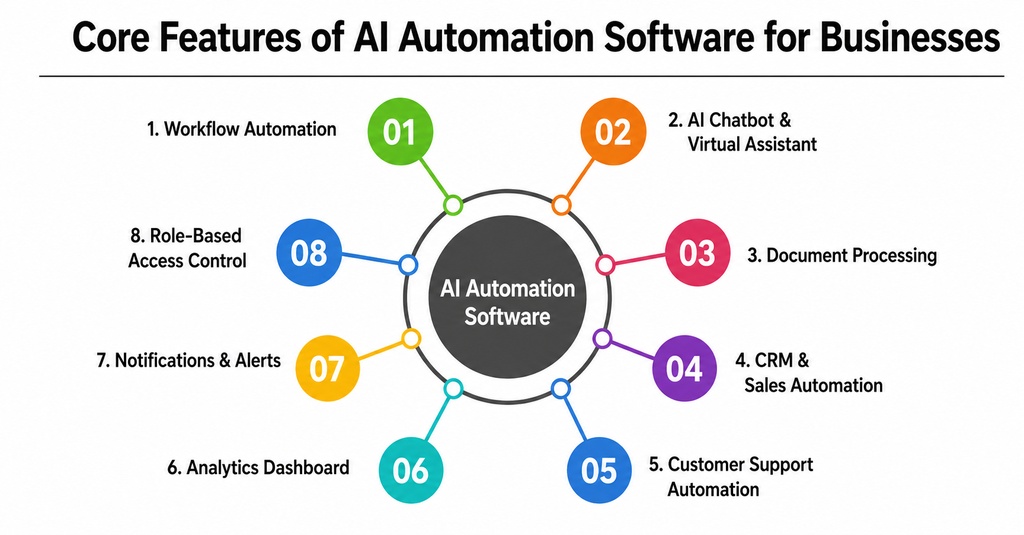
1. Workflow automation:
Automates approval flows, task assignments, reminders, follow-ups, and status updates across departments.
2. AI chatbot and virtual assistant:
Handles customer queries, employee questions, appointment booking, product recommendations, and internal support requests.
3. Document processing:
Reads invoices, contracts, forms, resumes, purchase orders, and reports to extract useful data automatically.
4. CRM and sales automation:
Captures leads, scores prospects, sends follow-up messages, updates customer records, and alerts the sales team.
5. Customer support automation:
Classifies tickets, suggests responses, detects urgency, and routes issues to the correct team.
6. Analytics dashboard:
Shows live performance data for sales, support, finance, marketing, HR, and operations.
7. Notifications and alerts:
Send real-time alerts when approvals are pending, payments are delayed, stock is low, or customers need urgent attention.
8. Role-based access control
allows companies to protect sensitive data by giving users only the access they need.
These core features create the base of AI automation for businesses. Without them, a platform may look advanced but fail to solve the everyday workflow problems that actually affect productivity.
Advanced Features of AI Automation for Businesses in 2026
Advanced AI automation is different from basic automation because it can understand business context, make recommendations, and manage complex workflows. These features are especially useful for businesses that want to scale automation across departments.
1. AI agents:
Goal-based assistants that can plan steps, use tools, check data, complete tasks, and ask for human approval when required.
2. Predictive analytics:
Uses historical data to forecast sales, customer churn, inventory demand, payment risk, and campaign performance.
3. Generative AI automation:
Creates emails, proposals, reports, summaries, social media content, product descriptions, and support replies.
4. Process mining:
Analyzes how workflows actually happen and identifies delays, repeated steps, and bottlenecks. Voice automation: Allows employees or customers to complete actions using voice commands, useful for field teams, logistics, and support.
5. Human-in-the-loop approvals:
Let AI prepare work while humans approve sensitive decisions in finance, healthcare, legal, and HR.
6. Compliance and anomaly detection:
Flags suspicious transactions, policy violations, unusual activity, and security risks.
7. No-code workflow builder:
Allows non-technical users to create automation flows with drag-and-drop tools.
The most powerful advanced feature in 2026 is agentic automation. Instead of automating only one instruction, AI agents can work toward a business goal. This makes automation more useful for sales follow-ups, recruitment screening, finance reconciliation, customer onboarding, and operations management.
How AI Automation for Businesses Works
AI automation works by combining data, intelligence, rules, integrations, and action. First, the system collects data from business tools such as CRM platforms, ERP systems, websites, email, chat apps, accounting software, HRMS platforms, spreadsheets, and customer support tools. This data becomes the input for the automation workflow.
Second, AI models analyze the input. For example, natural language processing can understand customer messages, document AI can read invoices, machine learning can predict churn, and generative AI can create a response or summary. The system then applies business logic to decide what should happen next.
Third, the automation engine acts. It may send an email, update a CRM record, create a support ticket, approve a low-risk request, assign a task, generate a report, or notify a manager. If the task is sensitive, the system can pause and request human approval.
Finally, the system records the result and shows performance on dashboards. Over time, teams can monitor accuracy, improve workflows, and adjust rules based on real business outcomes.
Business Benefits of AI Automation for Modern Companies
The biggest benefit of AI automation for businesses is productivity. Employees spend less time on repetitive work and more time on high-value activities. This improves output without always increasing team size.
- Faster operations: AI automation reduces delays by completing repetitive tasks immediately.
- Lower manual errors: Automated data entry, validation, and routing reduce mistakes in finance, support, and operations.
- Better customer experience: Customers receive faster replies, personalized communication, and timely updates.
- Improved decision-making: Predictive analytics and dashboards help leaders make decisions based on data instead of guesswork.
- Higher scalability: Businesses can manage more leads, tickets, invoices, and orders without expanding teams at the same speed.
- Cost optimization: Automation lowers the cost of repetitive work and improves resource utilization.
- Employee satisfaction: Teams can focus on creative, strategic, and relationship-driven work instead of boring manual tasks.
For many businesses, the strongest return on investment comes from automating workflows that happen every day. Even small time savings per task can become large savings when multiplied across thousands of activities each month.
Process to Develop AI Automation Software for Businesses
Building AI automation software requires a clear process because the solution must connect business goals, user experience, AI models, data quality, integrations, and security. A good development process reduces risk and helps the business create automation that actually works in real operations.
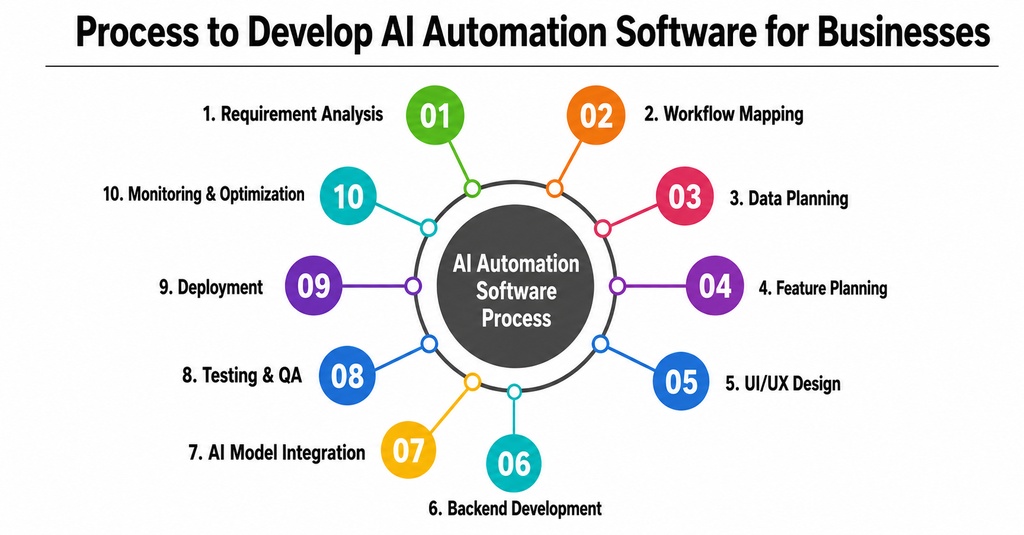
1. Requirement analysis
Identify the business problem, target users, departments, automation goals, and expected results.
2. Workflow mapping
Document each step of the current process, including triggers, decisions, approvals, exceptions, and tools used.
3. Data planning
Collect and clean data from CRM, ERP, documents, emails, databases, support tools, and spreadsheets.
4. Feature planning
Decide whether the product needs chatbots, document processing, AI agents, dashboards, RPA, or predictive analytics.
5. UI/UX design
Create simple dashboards, workflow builders, approval screens, analytics pages, and integration panels.
7. Backend development
Build APIs, database structure, workflow engine, authentication, permissions, notification systems, and integrations.
8. AI model integration:
Connect models for NLP, prediction, summarization, classification, data extraction, and content generation.
9. Testing and QA:
Test workflow accuracy, AI responses, edge cases, security, speed, and integration reliability.
10. Deployment
Launch the system on the cloud, private cloud, hybrid infrastructure, or on-premises servers based on business needs.
11. Monitoring and optimization:
Track performance, collect feedback, improve workflows, update models, and add new automation use cases.
The development process should always start with business value. A technically impressive automation tool is not useful if it does not reduce cost, save time, improve accuracy, or create better customer experiences.
How to Successfully Implement AI Automation in Your Business
Businesses should not try to automate everything at once. The best approach is to start with a high-impact workflow, measure results, and then expand automation gradually. This reduces risk and helps employees build trust in the system.
1. Choose one priority process:
Start with a workflow that is repetitive, measurable, and painful, such as lead follow-up, invoice processing, or support ticket routing.
2. Set measurable goals:
Define clear targets like reducing response time by 40%, automating 60% of tickets, or cutting manual data entry by 70%.
3. Prepare clean data:
AI automation depends on accurate data. Remove duplicate, outdated, and incomplete information before launch.
4. Keep humans in control:
Use approval steps for decisions involving money, legal risk, customer complaints, hiring, or sensitive data.
5. Train employees:
Explain how the automation works, what it can do, and when employees should intervene.
6. Monitor performance:
Track errors, completion rate, time saved, user feedback, and business impact.
7. Scale department by department:
After one workflow succeeds, expand automation to sales, support, finance, HR, operations, and marketing.
A successful implementation is not only a technical project. It is also a change-management project. Teams need training, confidence, and a clear understanding of how AI supports their daily work.
Required Team Structure to Develop AI Automation Software
The required team depends on project size, but a professional AI automation product usually needs business, design, engineering, data, AI, QA, security, and DevOps expertise. For a small MVP, some people may handle multiple roles. For an enterprise product, each role may require a dedicated specialist.
- Product manager: Defines product vision, roadmap, user needs, priorities, and business goals.
- Business analyst: Studies workflows, documents requirements, and connects stakeholders with the development team.
- UI/UX designer: Designs easy dashboards, workflow screens, reports, and user journeys.
- Frontend developer: Builds the user interface for dashboards, workflow builders, approvals, reports, and admin panels.
- Backend developer: Builds APIs, workflow logic, databases, authentication, integrations, and notification systems.
- AI/ML engineer: Creates or integrates AI models for language understanding, prediction, summarization, classification, and recommendations.
- Data engineer: Builds data pipelines, cleans data, manages storage, and connects business systems.
- QA engineer: Tests features, workflows, AI outputs, edge cases, performance, and integrations.
- DevOps engineer: Handles deployment, cloud infrastructure, CI/CD, monitoring, scaling, and backups.
- Security and compliance expert: Ensures encryption, access control, audit logs, data privacy, and regulatory readiness.
Monetization Methods for an AI Automation Business Platform
AI automation platforms can generate revenue in multiple ways. The best model depends on target customers, product complexity, usage volume, support requirements, and deployment type.
- Subscription model: Monthly or yearly SaaS plans based on features, workflow limits, users, or departments.
- Usage-based pricing: Charges based on automation runs, AI tasks, documents processed, chatbot conversations, or API calls.
- Per-user pricing: A simple model where companies pay for each user or seat.
- Enterprise licensing: Custom pricing for large companies that need private deployment, integrations, compliance, and dedicated support.
- AI agent add-ons: Premium pricing for specialized sales, support, HR, finance, or operations AI agents.
- Integration marketplace: Paid connectors for CRM, ERP, e-commerce, accounting, payment, and communication tools.
- Custom workflow setup: One-time fees for consulting, implementation, training, and workflow design.
- White-label model: Allows agencies or software companies to resell the platform under their own brand.
A hybrid model often works best. For example, a platform can offer subscription plans for basic access, usage-based charges for AI processing, and enterprise pricing for custom deployments.
Common AI Automation Challenges and Practical Solutions
AI automation has strong potential, but businesses must manage it carefully. Poor planning can lead to inaccurate outputs, integration issues, employee resistance, and security risks. The following challenges should be addressed early.
- Challenge: Poor data quality. Solution: Clean data before automation, remove duplicates, standardize formats, and create ownership for data maintenance.
- Challenge: Disconnected systems. Solution: Use API-first architecture and prioritize integrations with the tools that matter most to daily operations.
- Challenge: Employee resistance. Solution: Communicate that AI automation supports employees, provide training, and involve teams in workflow design.
- Challenge: AI hallucination or wrong output. Solution: Use confidence scores, verified data sources, human review, and clear fallback rules.
- Challenge: Security and privacy risk. Solution: Apply encryption, role-based access, audit logs, data minimization, and compliance checks.
- Challenge: Automating the wrong process. Solution: Start with workflows that are repetitive, measurable, and directly connected to business value.
The safest approach is to treat AI automation as a controlled business system, not a fully independent decision-maker. Human oversight remains important, especially for financial, legal, medical, and sensitive customer decisions.
Best AI Automation Use Cases Across Business Departments
AI automation becomes more valuable when it is applied across departments. Each department has repetitive workflows that can be improved with automation, analytics, and AI assistance.
- Sales: Lead scoring, follow-up emails, CRM updates, proposal generation, meeting scheduling, and pipeline forecasting.
- Marketing: Campaign reporting, content generation, audience segmentation, social media scheduling, and ad performance analysis.
- Customer support: Ticket classification, chatbot replies, sentiment detection, escalation, and knowledge-base suggestions.
- Finance: Invoice processing, payment reminders, expense approvals, reconciliation, fraud alerts, and cash-flow forecasting.
- HR: Resume screening, onboarding workflows, policy assistance, employee surveys, and interview scheduling.
- Operations: Inventory alerts, supplier follow-ups, order tracking, task assignment, and performance reporting.
- IT: Password reset automation, incident classification, access requests, system alerts, and internal helpdesk support.
The best use cases are usually high-volume and rules-heavy but still require some intelligence. These are perfect for AI automation because the system can process large amounts of information while humans manage exceptions and strategic decisions.
Future Trends in AI Automation for Businesses
The future of AI automation will be shaped by more autonomous agents, better integrations, stronger governance, and industry-specific platforms. Businesses will move beyond generic automation tools and adopt solutions designed for their exact workflows.
- Agentic workflows: AI agents will manage longer business processes such as onboarding, sales development, finance review, and customer retention.
- Industry-specific automation: Healthcare, finance, ecommerce, logistics, education, and manufacturing will use specialized AI automation platforms.
- Multimodal automation: Systems will understand text, images, voice, video, documents, and structured data together.
- Embedded AI in business software: CRM, ERP, HRMS, accounting, and support platforms will include automation directly inside daily workflows.
- Stronger AI governance: Businesses will need better audit trails, approval systems, model monitoring, and compliance reporting.
- Human-AI collaboration: The most successful companies will combine AI speed with human judgment, empathy, creativity, and accountability.
USP and Special Features of AI Automation for Businesses
The unique selling point of AI automation in 2026 is outcome-based automation. Traditional automation completes fixed tasks. Modern AI automation can manage complete business outcomes, such as qualifying a lead, resolving a support issue, processing an invoice, or preparing a recruitment shortlist.
The most important special feature is the AI agent. An AI agent can understand a goal, plan the steps, use connected tools, check available data, perform actions, and ask for approval when needed. This makes it different from a basic chatbot or workflow rule.
Other special features include no-code workflow builders, explainable AI recommendations, real-time dashboards, secure audit logs, multi-system integrations, and human-in-the-loop approvals. These features make the platform useful, trustworthy, and scalable for real business operations.
Conclusion
AI automation for businesses in 2026 is more than a productivity tool. It is becoming a strategic layer that connects people, data, systems, and decisions. Companies can use it to automate repetitive tasks, improve customer experience, reduce errors, lower costs, and make faster decisions.
The market numbers show strong growth across AI automation, AI agents, robotic process automation, business process automation, and hyperautomation. This proves that companies are not only testing AI; they are actively building automated business operations around it.
To succeed, businesses should start with the right workflow, prepare clean data, keep humans involved in sensitive decisions, train employees, and monitor results continuously. The future will belong to businesses that combine AI speed with human intelligence. AI automation will not replace the need for strategy, creativity, empathy, or leadership, but it will remove unnecessary manual work and help teams perform at a higher level.
FAQs
Que 1: What is AI automation for businesses?
AI automation for businesses means using artificial intelligence to automate tasks, workflows, decisions, communication, and reporting across departments such as sales, support, finance, HR, marketing, and operations.
Que 2: How is AI automation different from traditional automation?
Traditional automation follows fixed rules, while AI automation can understand language, analyze data, make predictions, generate content, classify documents, and support decision-making.
Que 3: Which business processes can be automated with AI?
Common processes include lead management, customer support, invoice processing, HR onboarding, marketing reports, inventory alerts, document review, meeting summaries, and internal helpdesk support.
Que: 4 Is AI automation suitable for small businesses?
Yes. Small businesses can use AI automation to reduce manual work, respond faster to customers, manage leads, automate invoices, and scale operations without hiring large teams immediately.
Que 5: What is the future of AI automation for businesses?
The future will be agentic, predictive, and workflow-based. AI systems will not only complete individual tasks but also manage complete processes with human approval where required.