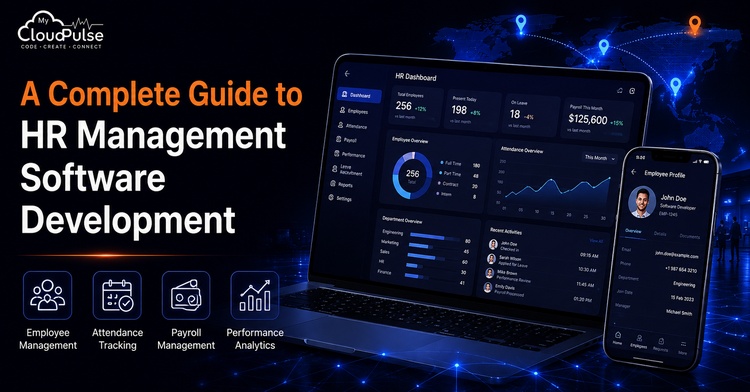
Growing businesses have to adopt hybrid and smart work models for managing employees’ efficiency and effectiveness, which is beneficial for business. The traditional HR procedure is based on spreadsheets, paperwork and several tools that are disconnected from each other. Several tasks of business have been done by traditional methods; they have chances of errors, and the process is also time-consuming, like generating payroll, staff member onboarding, attendance tracking facilities, management of leave and evaluation of working efficiency.
Human Resource Management Software (HRMS) is essential for organisations to automate and maintain required HR operations; it is a smart, centralised digital solution for business. In the current era, registration of employees, payroll procedures of staff members, recruitment processes, managing working performance, compliance, etc. – all HR operations – are done by modern HR tools and techniques.
Why Should Businesses Invest in Custom HR Management Software in 2026?
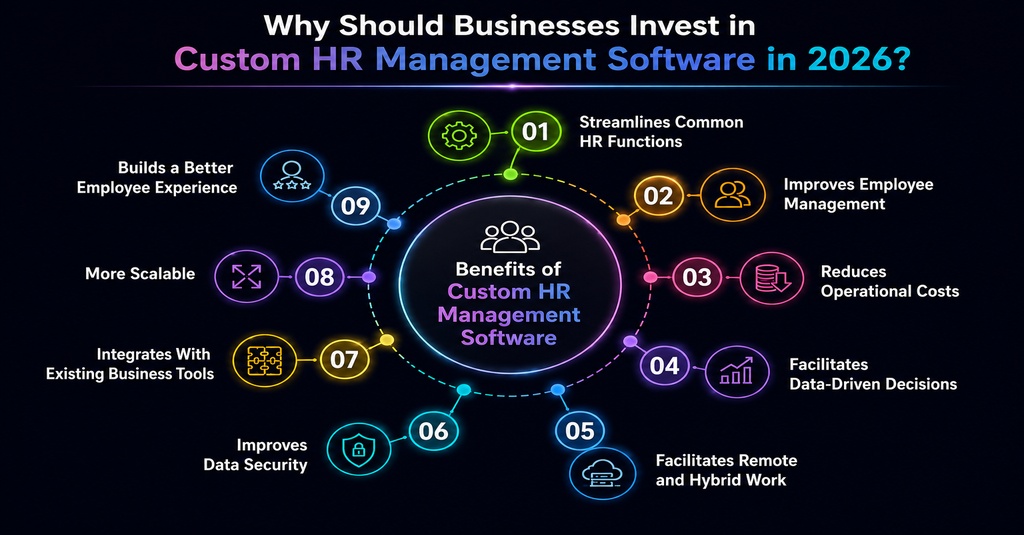
- Streamlines Common HR Functions: Automates payroll, attendance, leave management, employee onboarding, and other repetitive processes.
- Improves Employee Management: Offers a unified platform for managing employee profiles, work schedules, performance, documents, and HR records.
- Reduces Operational Costs: Automation cuts down on manual labour, paperwork, and administrative costs. Businesses can use their HR resources more efficiently.
- Facilitates Data-Driven Decisions: Real-time dashboards and HR analytics allow managers to track workforce performance, attendance, turnover, and other key metrics.
- Facilitates Remote and Hybrid Work: Cloud-based HR software allows employees and HR teams to access critical information and carry out tasks from any location.
- Improves Data Security: Role-based access, encryption, authentication, and secure data storage Custom HRMS solutions offer role-based access, encryption, authentication, and secure data storage by custom HRMS solutions to prevent unauthorised access to sensitive employee data.
- Integrates With Existing Business Tools: Custom software can integrate with payroll systems, accounting platforms, communication tools, attendance devices and other business applications.
- More Scalable: As a company grows, it can add new employees, departments, locations, workflows, features, etc. without replacing the whole system.
- Builds a Better Employee Experience: Self-service capabilities give employees the ability to handle their leave requests, payslips, attendance, personal information, and HR requests on their own.
Understanding HRMS, HRIS, HCM, and Modern HR Software
Human resource management software has evolved beyond a simple database for employee records. Several types of tools and techniques are used by companies to manage and handle every HR operation, like recruitment of employees, determining working performance, evaluating payroll, and determining working style and working patterns of employees. Therefore, they represent and explain a few important and modern aspects of HR that are beneficial for managing HR operations in a systematic manner, such as ‘Human Resource Management System’ (HRMS), ‘Human Resource Information System’ (HRIS), and ‘Human Capital Management’ (HCM).
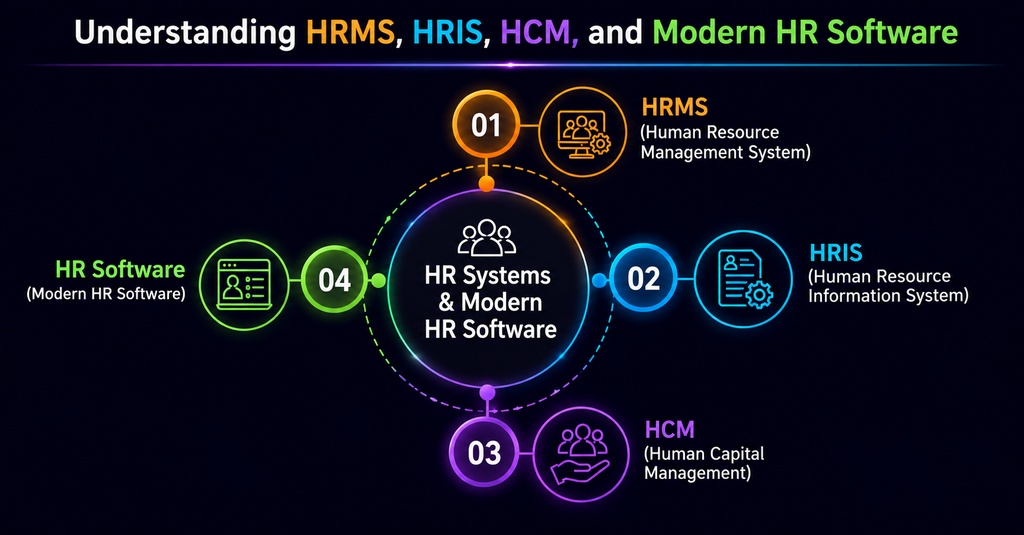
1. HRMS (Human Resource Management System)
It is a support system that provides end-to-end support to a company’s HR. HRMS is a comprehensive software system primarily used for managing employees’ documents and data, attendance, payroll procedures, recruitment processes, onboarding activities, performance tracking, and much more.
2. HRIS (Human Resource Information System)
The HR management team of the company commonly uses this software as their primary tool. The HRIS system is used to collect, target, store, and manage employee documents, thereby supporting HR administrative operations. HRIS primarily focuses on evaluating and maintaining employee documents, as well as tracking details related to attendance and staff enrolment.
3. HCM (Human Capital Management)
HCM is a strategic approach to managing HR operations. Its main duties are recording documents, processing payroll and managing the attendance of employees so that the HR department can attain their decided future targets. Hence, HCM combines the features of HRMS and HRIS systems, as it incorporates modern techniques and methods of processing that exceed the capabilities of both HRMS and HRIS.
4. HR Software
This software is the most common tool that is used by HR management of the company. HR software is tailored to a company’s specific requirements; therefore, it is specialised and can effectively focus on individual HR operations, such as employee payroll, application tracking, and more.
Custom vs Ready-Made HR Software: Which Solution Is Right for Your Business?
Develop a custom HRMS and a ready-made HR solution. These two HR software are mainly chosen by business firms for tailoring their necessities or purchases and also with pre-built qualities. The choice of organisation determines the company’s investment level, operational requirements, targets, and level of customisation.
Custom HRMS
- Tailored Features: HR procedure, ethics and working system built specifically.
- Greater Flexibility: According to the requirements, the company can implement some changes and innovate their existing features.
- Better Scalability: Organisations can recruit employees, expand the firm and try to enter new markets; these things can be evaluated by the system.
- Easy Integration: Payroll style, accounting, attendance system, ERP, CRM and other business working styles can be combined with these.
- Enhanced Control: Over data and information, functionality of the system, safety and permission, clients have greater control of business.
- Higher Initial Cost: Development requires a larger upfront investment compared with subscribing to ready-made software.
- Longer Development Time: Few tasks take as much time as designing, creating, testing and deploying a platform.
Ready-Made HR Software
- Faster Deployment: As compared to developing software from scratch and pre-built solutions, the pre-built solution is more effective and faster.
- Lower Initial Investment: Businesses typically prefer not to purchase complete software development; instead, they opt to pay for subscriptions and licenses.
- Pre-Built Features: Usually, attendance, payroll, employee recruitment, management of staff members, etc. – all these common features are available.
- Limited Customisation: To match the qualities and capabilities, businesses can modify their working environment and workflow.
- Regular Updates: Managing, upgrading, bug fixing and infrastructure – all these may be provided by the software.
- Potential Integration Limitations: Some platforms may have limited integration options or charge additional fees for advanced integration.
- Recurring Costs: Subscription or licensing fees can continue for as long as the business uses the platform.
Why Document Management Is Essential in Modern HRMS
Employees’ paperwork, recruitment, resumes, offer letters, identification of documents, salary records, quality and performance reports and other documents related to the employees are handled and managed by the HR departments of the company. If all these works are managed and maintained manually, then there is a high chance of generating issues like misleading documents, duplicate data, safety problems and unnecessary administration work.
For resolving issues related to the HR department of a company, an HRMS tool can be implemented and used with a built-in document management system that helps to centralise and manage a way to record, access and maintain employee data systematically.
- Centralised Document Storage: Keeps employee-related files in one secure location instead of scattered folders, emails, or physical cabinets.
- Easy Document Access: Authorised HR staff can quickly find and access documents whenever they are needed.
- Better Data Security: Role-based permissions, authentication, and access controls help protect confidential employee information.
- Automated Document Workflows: HR teams can automate processes such as document submission, approval, verification, and renewal reminders.
- Digital Employee Records: Employees can have individual digital profiles containing their contracts, certificates, identification documents, payslips, and other relevant records.
- Document Search & Organisation: Searching, filtering, categorisation, and tagging make it easier to locate specific files without going through multiple folders.
- Version Control: Helps HR teams track updated versions of important documents and reduce confusion caused by outdated files.
- Compliance Support: Maintaining organised records and access logs can help businesses meet internal policies and applicable employment and data-protection requirements.
- Reduced Paperwork: Digitising documents reduces physical storage requirements and makes HR operations more environmentally friendly.
- Improved Employee Self-Service: Employees can upload, view, or download permitted documents through a self-service portal, reducing repetitive requests to HR teams.
Key Challenges to Consider When Developing HRMS Software
Creating a human resource management system entails more than just introducing changes to payroll and employee management software. Several considerations should be made by businesses throughout development of the system due to the sensitive nature of employee information and the fact that it handles various HR functions.
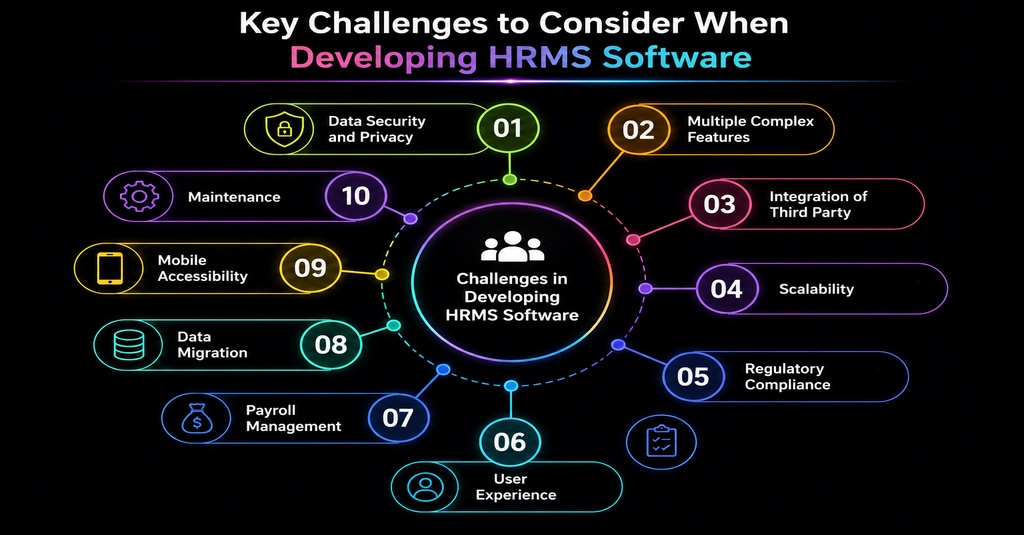
Among the most difficult aspects of creating an HRMS are the following:
- Data Security and Privacy: Personnel salary information, personal details, and financial details are just a few examples of the sensitive data stored by an HRMS. As such, the system requires robust security features to protect the data from being accessed by unauthorised individuals.
- Multiple Complex Features: For addressing multiple HR features and aspects like managing workflow, recruitment, payroll of employees, attendance, leaves, working performance and employee management, you have to create a smart and motivational team.
- Integration of Third Party: For operating working systems and software of the company in which the payroll system, attendance by biometric machine, email, and accounting software are concluded, HRMS is necessary to be implemented in the organisation.
- Scalability: Without impacting the working performance of employees, the software should be designed in effective ways so that it can enhance the number of staff members, departments, and transactions of the company with proper security.
- Regulatory Compliance: If a business wants proper satisfaction of several rules and regulations in several jurisdictions, they have to modify their existing system.
- User Experience: The HRMS should have a satisfactory user interface and be easy to use and navigate. On the basis of different roles and responsibilities, they have to be accessed by the system. The main users of an HRMS include the HR manager, staff members, recruiters and administration.
- Payroll Management: Payroll management is a critical function that requires accurate calculations of salaries, deductions, bonuses, and other benefits. Inaccuracies can cause significant financial losses to the business and may offend employees.
- Data Migration: Data migration is the process of importing employee data from other systems or spreadsheets into the new HRMS. This can be a complex process, especially when dealing with unstructured and dirty data.
- Mobile Accessibility: Most people, including employees and employers, prefer to access online services through their mobile phones. As such, the developers should consider building a mobile-friendly application or website.
- Maintenance: An HRMS requires regular maintenance to fix bugs, enhance security features, and improve performance.
Key Security Features Every HR Management System Should Have
HRMS systems can safeguard personnel and company data containing personal details, salary information, personal identification documents, attendance data, and performance records from illegal access using advanced security features.
1. Role-Based Access Control (RBAC)
The role-based access feature allows only specific individuals or teams to access specific HRMS functions and information.
2. Multi-Factor Authentication
Its feature helps enhance data safety by adopting more reliable user authentication methods.
3. Data Encryption
This feature also safeguards critical information, ensuring the confidentiality and security of data in transit and at rest.
4. Secure Login & Password Management
Secure login options offer various password protection and user authentication options for every business organisation. They also provide an option for resetting, securing, and restoring forgotten passwords and protect company data from illegal access.
5. Audit Logs
Audit logging records and tracks all authorised and unauthorised access attempts, including user activities, documents accessed, and modifications made to the system. It also facilitates generating reports on the login activities, access requests, and approvals made within the system.
6. Data Backup & Recovery
This feature ensures there are regular backups of the most recent employee data, crucial for retrieving valuable information if the system fails or experiences a data disaster. This data recovery feature is essential in protecting the company against information loss and sabotage.
7. Secure Document Management
This feature ensures there is confidentiality, integrity, and availability of all electronic documents and information within the system. It also prevents unauthorised access to sensitive employee data and offers a reliable search option for documents and files.
8. Session Management
This feature allows a company to control and monitor online user sessions, including logging out of inactive sessions for better data security. It also denies illegal access to company data through unauthorised gadgets.
9. Application Programming Interface (API) Security
It offers additional security options that can be used when linking the HRMS to other software applications like biometric devices, time attendance systems, payroll systems, and accounting systems. This feature is vital in providing a safer connection for transmitting sensitive employee data between different systems.
10. Regular Security
Its updates ensure that all security flaws and weaknesses in the HRMS software application are regularly identified and addressed. This feature is critical in safeguarding the system against illegal access and other possible cyber crimes.
Conclusion
HR management software helps companies to digitalise and automate time-consuming human resource processes while also helping to centralise all employee data. By using the right HRMS for their business, organisations can optimise their operations and cut down on tedious administrative tasks, which include payroll, attendance, recruitment, document storage, performance management, and employee self-service portals, among others.
When building an HRMS, you must consider several factors, including security, scalability, integration, compliance, ease of use, and maintenance. At the same time, businesses must weigh the pros and cons of both custom-coded and ready-made solutions to choose the best option according to their budget and specific needs.
Modern trends in the workplace include the rise of remote and hybrid work. Thus, a highly secure and scalable HRMS can help businesses to maximise their efficiency while also offering employees a comfortable working environment.
FAQs
Que 1: How much does it cost to develop HRMS?
Answer 1: Everything depends on its features, complexity level, integrations, technology, and development requirements.
Que 2: How long does it take to develop HRMS?
Answer 2: It depends on the features and complexity level of the product. Usually, the development of the conventional HRMS takes less time than enterprise-level systems.
Que 3: What functions does HRMS usually include?
Answer 3: It usually includes employee management, payroll, attendance, recruitment, leaves, performance management, document storage, and reports.
Question 4: Is it better to develop custom HRMS software or purchase an off-the-shelf application?
Answer 4: Custom-developed HRMS solutions are highly customisable and offer greater flexibility than off-the-shelf software. However, ready-made applications have their own advantages, such as being cost-effective and quick to implement.
Que 5: How can I secure the data in my HRMS software?
Answer 5: By using encryption, MFA, role-based access, API security, audit logs, regular backups, and updates.