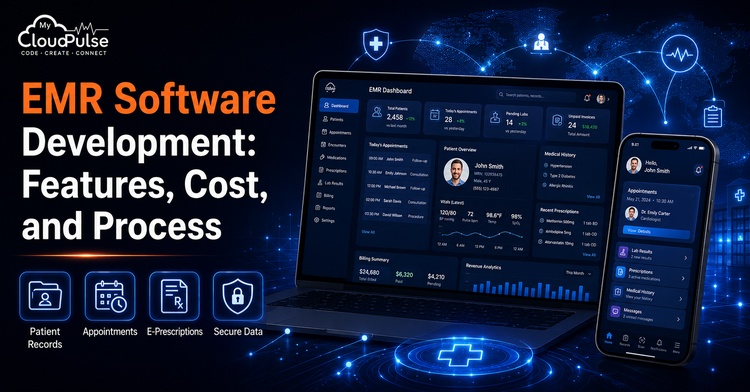
Daily, healthcare organisations manage vast amounts of sensitive and interrelated data. Ensuring the accuracy, accessibility, and security of patient records is of utmost importance. This includes medications, medical histories, lab results, clinical notes, appointments, billing information, and insurance claims.
EMR software development has enabled medical facilities, diagnostic centres, speciality offices, and clinics to move away from decentralised paper-based operations and towards a unified digital platform. Clinical documentation, patient interaction, billing, reporting, interoperability, and administrative procedures can all benefit from a well-designed system that also reduces repetitive manual effort.
It takes more than just making forms and storing patient data to build an EMR platform. The programme must meet requirements for being secure, scalable, user-friendly, interoperable, and compliant with healthcare regulations that are relevant to its target market.
EMR Software Market Statistics
Forecasts indicate that the worldwide electronic health record (EHR) market will expand from its 2025 valuation of over $31.12 billion to a whopping $32.92 billion in 2026, a CAGR of around 5.9%. With a predicted CAGR of around 6.1%, the same market is projected to reach around USD 41.85 billion by 2030. (According to BRC, the source.)
The United States has a very high adoption rate. Nearly all doctors’ offices adopted electronic health records (EHRs) in 2024, with nearly all using certified EHRs. Nearly all acute-care hospitals that are not part of the federal system have adopted certified electronic health records. According to HealthIT.gov,
Based on these numbers, it seems like the potential of the future goes beyond simple digitisation. Priorities in demand include modernising incompatible systems, enhancing interoperability, implementing AI-assisted workflows, bolstering mobile access, moving to the cloud, and developing healthcare solutions tailored to specific specialities.
EMR vs EHR Software
Although they sound similar, electronic medical record (EMR) and electronic health record (EHR) actually mean slightly different things.
In a typical healthcare facility, such as a clinic, hospital, or other healthcare organisation, an electronic medical record system keeps digital patient records. Appointment details, medication lists, test results, physician notes, and diagnoses are all possible components.
In most cases, an EHR provides a broader scope. Its goal is to serve as a longitudinal patient record that other healthcare facilities and organisations can access and use.
Modern EMR/EHR software development frequently combines these two ideas. In addition to managing internal clinical procedures, a platform can facilitate external data interchange via application programming interfaces (APIs), health information networks (HINs), labs, pharmacies, insurance companies, and patient applications.
What is the function of an electronic medical record system?
When a patient signs up for services either online, via a mobile app, at the front desk, or via an outside referral, the electronic medical record (EMR) workflow often starts.
Information such as demographics, insurance data, medical history, allergies, contact information, and consent records is created or identified by the system and stored in the patient profile. Afterwards, the system sets up a consultation with the appropriate doctor.
While consulting with a patient, the doctor will review their medical history and make notes on any symptoms, observations, diagnoses, treatment programmes, medications, and prescriptions. Additionally, the platform allows the provider to directly order imaging procedures, laboratory tests, or referrals.
The associated diagnostic or laboratory system receives instructions to conduct tests. Notifications or clinical alerts may be triggered by attaching the results to the patient record as soon as they are available.
The billing module processes charges, checks insurance information, files claims, tracks payments, and updates financial data after the consultation. A secure portal or mobile app is available to patients, allowing them to access specific information.
The entire process creates a unified digital workflow, starting from the first consultation and registration through treatment, payment, follow-up, and reporting.
Core Features of EMR Software Development
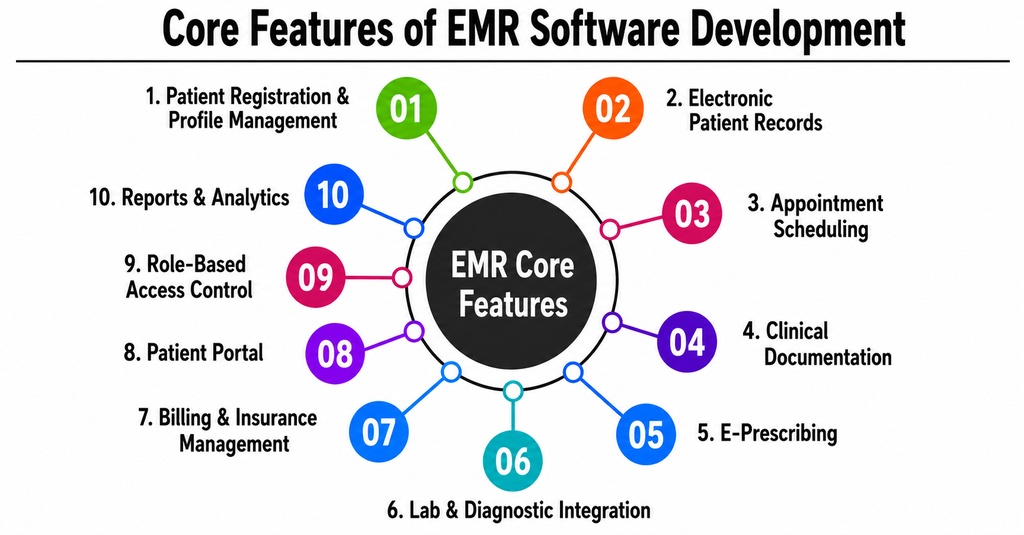
1. Patient Registration and Profile Management
The patient-management module stores demographic information, contact details, emergency contacts, insurance data, preferred language, consent records, and communication preferences.
Duplicate-detection capabilities are important because multiple profiles for the same patient can create clinical and billing risks. The system should identify possible matches using combinations of name, date of birth, mobile number, email address, and identification details.
2. Electronic Patient Records
The electronic patient chart is the foundation of an EMR system. It should present a structured overview of the patient’s:
- • Medical history
- • Diagnoses
- • Allergies
- • Medications
- • Immunizations
- • Procedures
- • Laboratory reports
- • Imaging results
- • Clinical notes
- • Treatment plans
- • Previous appointments
Information should be organised clearly so clinicians can locate critical details without navigating through numerous screens.
3. Appointment Scheduling
The scheduling module allows patients and staff members to book, reschedule, cancel, and manage appointments.
Advanced scheduling rules can account for provider availability, appointment type, room availability, equipment requirements, consultation duration, holidays, and multi-location schedules.
Automated email, SMS, push-notification, or WhatsApp reminders can reduce missed appointments and improve patient communication.
4. Clinical Documentation
Doctors, nurses, and other authorised professionals need efficient tools for recording clinical encounters.
The system may support SOAP notes, speciality-specific templates, structured forms, free-text notes, reusable phrases, diagrams, attachments, and electronic signatures.
Templates should remain customisable, as documentation requirements vary across cardiology, dentistry, dermatology, mental health, orthopaedics, paediatrics, and other specialities.
5. E-Prescribing
The e-prescription module allows clinicians to create and transmit prescriptions electronically.
It can maintain medication histories, dosage instructions, refill information, preferred pharmacies, and discontinuation records. Safety functions may alert clinicians to known allergies, duplicate medicines, contraindications, or potential drug interactions.
Clinical alerts should support decision-making without producing excessive notifications that users begin to ignore.
6. Laboratory and Diagnostic Integration
A connected EMR can send test orders to laboratories and receive structured results automatically.
Integration reduces manual data entry and helps prevent results from being attached to the wrong patient. The system may support laboratory information systems, radiology platforms, imaging archives, pathology systems, and external diagnostic providers.
Abnormal findings can be highlighted and routed to the appropriate clinician for review.
7. Billing and Insurance Management
Billing capabilities may include charge capture, invoice generation, insurance eligibility verification, claim submission, payment tracking, rejection management, and financial reporting.
Linking clinical documentation with billing reduces the need to enter the same information repeatedly. It also helps administrative teams identify incomplete documentation before submitting claims.
Requirements vary significantly between countries, insurance systems, and provider types. Therefore, billing workflows should be designed for the target market.
8. Patient Portal
A patient portal gives patients controlled access to selected healthcare information.
Patients may be able to:
- • View upcoming appointments
- • Request or cancel appointments
- • Download reports
- • Review prescriptions
- • Receive educational material
- • Pay invoices
- • Complete intake forms
- • Update profile information
- • Exchange secure messages
- • Join telemedicine consultations
Patients should only see information that is authorised by the healthcare organisation and permitted by applicable regulations.
9. Role-Based Access Control
Restrict access to patient records and administrative functions based on role.
The system should assign permissions according to roles such as doctor, nurse, receptionist, laboratory technician, billing executive, pharmacist, administrator, and system owner.
The system may also limit access based on department, facility, location, patient relationship, or assigned responsibility.
In the United States, the HIPAA Security Rule requires regulated entities to implement access controls, audit controls, authentication procedures, integrity safeguards, and protections for electronic health information transmitted over networks. (Source: U.S. Department of Health and Human Services.)
10. Reports and Analytics
An EMR reporting module can provide information on clinical activities, appointment performance, revenue, claims, patient demographics, provider productivity, treatment outcomes, and operational bottlenecks.
Reports should support filters, role-based visibility, downloadable formats, and scheduled delivery. Sensitive information should be masked or aggregated when individual patient details are unnecessary.
11. Audit Trails
An audit trail records actions performed within the system, including:
- • Record creation and modification
- • Patient-chart access
- • Login attempts
- • Document downloads
- • Data exports
- • Permission changes
- • Prescription activity
- • Administrative actions
Audit logs support investigations, compliance reviews, security monitoring, and accountability.
12. Data Backup and Recovery
EMR platforms must include encrypted backups, recovery procedures, data-retention policies, system monitoring, and disaster-recovery planning.
Backups should be tested periodically. A backup that has never been restored successfully cannot be considered a reliable recovery solution.
Fundamentals of Developing EMR Software
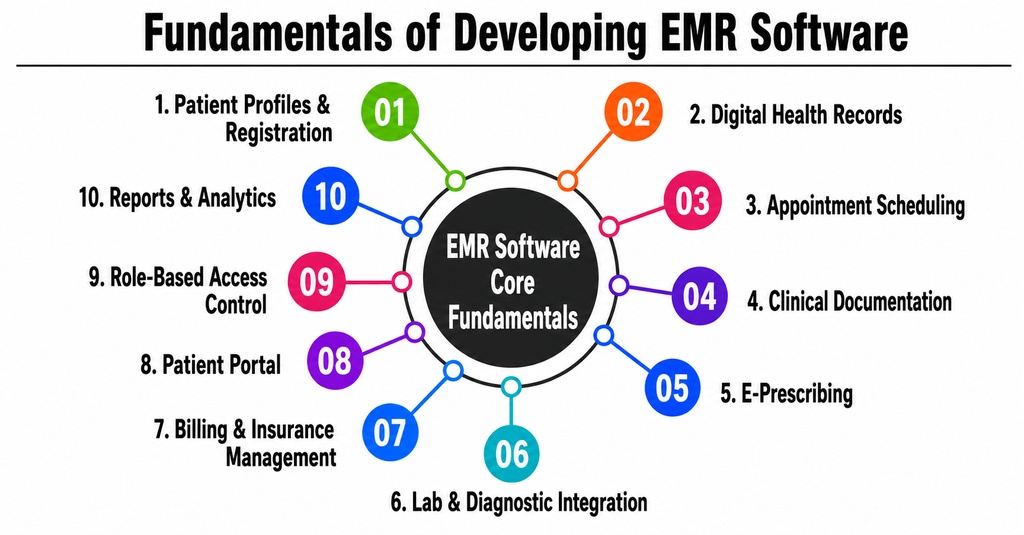
1. Management of Patient Profiles and Registration
You can find a patient’s preferred language, consent records, preferred method of communication, insurance information, preferred method of emergency contact, preferred method of contact, and demographic information in the patient-management module.
Duplicate-detection capabilities are crucial because having many profiles for the same patient can lead to clinical and accounting concerns. Using a user’s name, DOB, cell phone number, email address, and other identifying information, the system should be able to find potential matches.
2. Digital Health Records
An EMR system cannot function without the electronic patient record. Specifically, it needs to provide a summary of the patient’s
- • A patient’s medical background
- • Medications
- Intolerances
- • Prescribed drugs
- • Inoculation
- • Actions
- • Findings from experiments
- • Findings from imaging
- • Records from clinical settings
- • Strategies for treatment
- • Schedules from the past
Clinicians should be able to locate important details without having to go through a maze of displays; therefore, information should be clearly organised.
3. Making Appointments
Appointments can be booked, rescheduled, cancelled, and managed through the scheduling module.
Specialist scheduling algorithms can take into account the availability of providers, appointment types, rooms, equipment needs, consultation length, holidays, and schedules involving multiple locations.
Better patient communication and fewer missed appointments are possible with automated reminders sent by email, text message, push notification, or WhatsApp.
4. Medical Record Keeping
Efficient solutions for documenting clinical contacts are necessary for authorised professionals, including doctors and nurses.
Possible features of the system include support for structured forms, free-text notes, reusable phrases, illustrations, attachments, electronic signatures, and speciality-specific templates.
Cardiology, dentistry, dermatology, mental health, orthopaedics, paediatrics, and other specialities have different documentation requirements; therefore, templates should still be customisable.
5. Online Prescription Dispensing
Doctors can write and send electronic prescriptions using the e-prescription module.
The system saves medications, dosages, refill info, preferred pharmacies, and records of stopping use. For example, safety features might notify doctors of known allergies, drug interactions, contraindications, or duplicate medications.
Clinical alerts should aid decision-making without overwhelming consumers to the point that they start ignoring them.
6. Integration of Diagnostic Laboratories and Services
Integrating EMR systems allows for the automated transmission of test requests to labs and the receipt of structured results.
As a result of integration, less data entry is required, and it is easier to avoid associating findings with the incorrect patient. Some of the potential users of the system include third-party diagnostic labs, imaging archives, radiology platforms, pathology systems, and laboratory information systems.
Highlighting and routing abnormal findings to the relevant clinician for examination is possible.
7. Management of Bills and Insurance
Billing capabilities include charge capture, invoicing, verifying insurance eligibility, submitting claims, tracking payments, managing rejections, and financial reporting.
By integrating clinical records with billing, we can minimise data duplication. Before claims are submitted, administrative teams can use it to locate any missing documents.
Criteria differ substantially across nations, insurance schemes, and provider categories. So, it’s important to tailor billing processes to the intended audience.
8. Online Portal for Patients
Through a patient portal, individuals are able to gain regulated access to certain medical records.
It is possible for patients to:
- • See when appointments are coming up
- Schedule or reschedule meetings
- • Access reports
- • Evaluate medication regimens
- • Obtain course materials
- • Make payment for invoices
- • Fill out intake paperwork
- • Revise personal details
- • Communicate via encrypted means
Become a part of online medical consultations; only patient information that is authorised by the healthcare provider and permitted by law should be visible to the patient.
9. Control Relating to Roles
Not everyone on staff should have unrestricted access to all administrative functions and patient records.
Roles like doctor, nurse, lab tech, administrator, billing executive, pharmacist, and system owner should be able to have their rights set up in the system.
Location, department, facility, patient relationship, or assigned task might also limit access.
The HIPAA Security Rule mandates that all regulated entities in the US have measures in place to protect electronic health information during transmission over networks, including controls for access and auditing, authentication processes, integrity safeguards, and more. [This information is sourced from the United States Department of Health and Human Services.]
10. Analytics and Reports
Data on clinical activities, appointment success, revenue, claims, patient demographics, provider efficiency, treatment results, and operational bottlenecks can be found in an electronic medical record reporting module.
Scheduled delivery, downloadable formats, role-based visibility, and filters should all be available in reports. When specific patient information is not needed, it is important to conceal or aggregate the sensitive data.
Advanced Features of EMR Software
1. AI-Assisted Clinical Documentation
AI can help convert conversations or dictated notes into structured clinical documentation. It may suggest summaries, organise information into predefined sections, and identify any missing details.
AI-generated content should remain both reviewable and editable. Final clinical responsibility must stay with qualified healthcare professionals.
2. Clinical Decision Support
Decision-support tools can analyse diagnoses, medications, laboratory values, allergies, age, and medical history to provide relevant reminders or warnings.
Examples include vaccination reminders, preventive-care recommendations, abnormal-result alerts, drug-interaction warnings, and condition-specific care pathways.
3. Predictive Analytics
Predictive models can help identify patients who may require follow-up, are at risk of missing appointments, or may experience deterioration.
Because healthcare predictions can influence clinical decisions, organisations should evaluate model accuracy, bias, explainability, data quality, and accountability before deployment.
4. Voice Recognition
Voice-enabled documentation allows clinicians to dictate notes rather than type them manually.
The system can convert speech into text, recognise medical terminology, and place information in the relevant fields. Clinicians must be able to review and correct transcription errors before signing the record.
5. Telemedicine Integration
Telemedicine features may include video consultations, appointment queues, online payments, digital intake forms, consultation notes, electronic prescriptions, and follow-up scheduling.
Keeping the telemedicine workflow within the EMR avoids having to maintain disconnected patient records across multiple platforms.
6. Remote Patient Monitoring
Connected devices can transmit readings such as blood pressure, glucose level, weight, oxygen saturation, heart rate, and temperature.
The system may display trends and generate alerts when measurements cross defined thresholds. Healthcare providers must define who reviews incoming data and what action they take when an alert appears.
7. FHIR and HL7 Interoperability
Interoperability enables the EMR to exchange information with laboratories, pharmacies, hospitals, health-information exchanges, insurance platforms, and patient applications.
FHIR is an HL7 standard for exchanging healthcare information using modular data resources and modern API-based approaches. CMS also requires that certain healthcare data be made available through standards-based FHIR APIs in applicable interoperability programmes. (Source: HL7 FHIR.)
8. Mobile EMR Applications
A clinician application can provide secure access to patient summaries, schedules, tasks, results, prescriptions, and notifications.
A patient application may support appointment booking, reports, payments, teleconsultations, prescriptions, and reminders.
Healthcare organisations selecting a mobile app development company should verify that the team understands healthcare security, offline data handling, device permissions, session management, API security, and regulatory requirements.
9. Multi-Location Management
Hospital groups and clinic chains may need centralised control over multiple branches.
The system should support location-specific schedules, staff permissions, inventories, pricing, billing rules, departments, reporting, and patient transfers while maintaining a unified patient identity.
What Makes a Custom EMR Solution Unique?
The main advantage of developing custom EHR software is workflow alignment.
Generic products often require healthcare teams to modify their established processes around predefined software. A custom platform can instead reflect the organisation’s actual clinical pathways, documentation formats, approval rules, specialities, and operational structures.
A specialised solution can also provide the following:
- • Custom clinical templates
- • Local language support
- • Regional billing workflows
- • Specialty-specific terminology
- • Custom reports and dashboards
- • Existing-system integrations
- • Flexible patient-communication channels
- • Data-ownership and hosting options
- • White-label branding
- • Modular expansion
The strongest USP is not simply the number of features. It is the ability to deliver the right information to the right user at the right point in the care process.
EMR Software Development Process
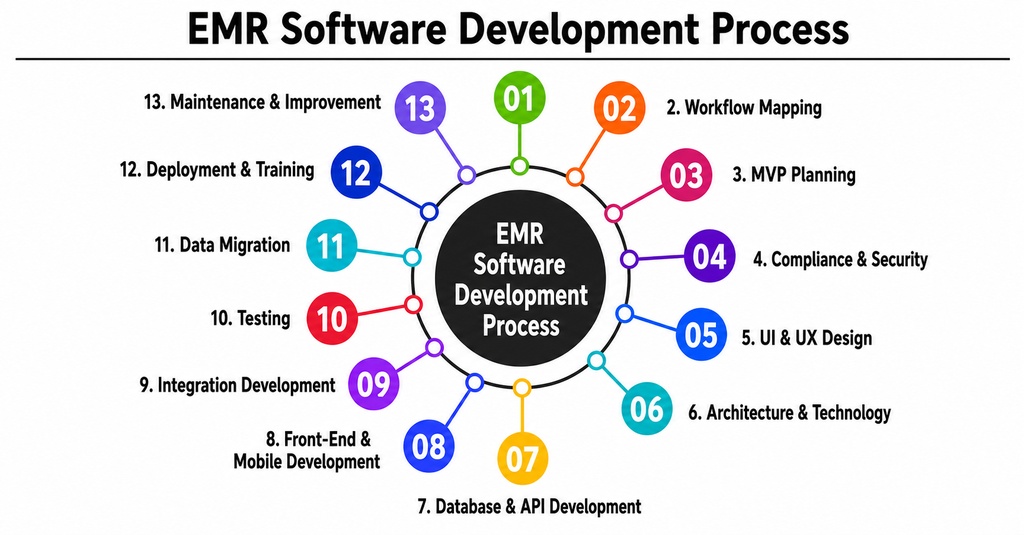
1. Discovery and Requirement Analysis
Development begins with understanding the organisation, users, facilities, specialities, workflows, integrations, and regulatory environment.
The discovery team should interview doctors, nurses, receptionists, billing staff, laboratory users, administrators, IT teams, and compliance stakeholders.
The resulting requirements document should define user roles, clinical workflows, data fields, integrations, reports, security expectations, and project boundaries.
2. Workflow Mapping
The development team maps processes such as registration, appointment booking, consultation, prescription, laboratory ordering, result review, billing, discharge, and follow-up.
The purpose is to identify delays, duplicate entries, manual handoffs, and exceptions before automating the workflow.
Digitising an inefficient process without redesigning it generally results in a digital version of the same inefficiency.
3. MVP Planning
The first release should focus on essential workflows instead of attempting to deliver every possible feature.
A clinic MVP may include patient profiles, scheduling, clinical documentation, prescriptions, billing, reporting, access control, and audit logs.
In later phases, we can introduce telemedicine, AI documentation, advanced analytics, wearable integrations, and patient engagement tools.
4. Compliance and Security Planning
Security and privacy requirements must be considered from the beginning.
The team should identify the regulations applicable to the target region, such as HIPAA-related requirements in the United States or other national healthcare and data-protection frameworks.
Security planning typically covers authentication, authorisation, encryption, auditability, secure APIs, backup, incident response, data retention, consent, and third-party access.
5. UI and UX Design
EMR interfaces should prioritise speed, clarity, and a low cognitive load.
Designers create information architecture, user journeys, wireframes, clickable prototypes, design systems, and responsive layouts.
Clinicians should test prototypes before development begins. Feedback from real users can reveal unnecessary steps, confusing labels, missing clinical context, and impractical screen layouts.
6. Architecture and Technology Selection
The technical architecture should be selected according to user volume, facility count, integration requirements, availability expectations, data residency, and deployment model.
Common components include web applications, mobile applications, backend services, relational databases, document storage, notification services, integration engines, monitoring tools, and analytics platforms.
The platform may be deployed in the cloud, on-premises, or through a hybrid architecture.
7. Database and API Development
The backend team creates patient-data models, business rules, authentication services, clinical workflows, audit mechanisms, reporting services, and external APIs.
Healthcare data relationships require careful design, as records may involve encounters, practitioners, organisations, observations, medications, conditions, procedures, claims, and documents.
APIs should be versioned, documented, secured, monitored, and tested for unauthorised access.
8. Front-End and Mobile Development
The front-end team develops interfaces for clinicians, patients, receptionists, billing teams, and administrators.
Mobile development may include separate applications or role-based experiences within a common application.
During implementation, the team should address accessibility, responsive design, secure local storage, session timeout, and network-failure handling.
9. Integration Development
The EMR may need to connect with:
- • Laboratories
- • Pharmacies
- • Imaging systems
- • Medical devices
- • Insurance providers
- • Payment gateways
- • Accounting software
- • Telemedicine tools
- • Government health platforms
- • Health-information exchanges
Each integration should include authentication, error handling, retry logic, logging, reconciliation, and operational monitoring.
10. Testing
EMR testing should cover functionality, integration, usability, performance, security, data migration, access permissions, backup recovery, and clinical workflows.
User-acceptance testing should involve healthcare professionals from different departments.
Testing should also include exceptional situations, such as duplicate patients, unavailable external systems, interrupted consultations, incorrect permissions, incomplete records, and failed claim submissions.
11. Data Migration
Historical information may need to be migrated from spreadsheets, paper records, databases, or legacy EMR products.
Migration involves data mapping, cleaning, deduplication, transformation, validation, reconciliation, and approval.
Organisations should decide which information must remain structured, which documents can be imported as files, and which historical data should be archived.
12. Deployment and Training
Deployment may begin with a pilot department or location before rolling out organisation-wide.
Doctors, nurses, administrators, and support teams require role-specific training. Quick-reference guides, video tutorials, sandbox environments, and floor support can improve adoption.
13. Maintenance and Continuous Improvement
Post-launch work includes software updates, monitoring, security patches, infrastructure management, user support, feature improvements, integration maintenance, performance optimisation, and compliance updates.
EMR development should be treated as a continuous healthcare technology programme, not a one-time installation.
Also Read: Clinical Case Simulator Software Development – Cost and Key Features
EMR Software Development Cost
The cost depends on system complexity, user roles, integrations, regulatory scope, application platforms, data migration, deployment model, and development-team location.
The following figures are broad planning estimates rather than fixed quotations:
• Basic clinic MVP: 4-6 months; approximately USD 40,000-80,000
• Multi-specialty EMR: 6-10 months; approximately USD 80,000-180,000
• Hospital or multi-location system: approximately USD 180,000-500,000+ and 10-18 months
• Enterprise ecosystem with advanced integrations: approximately USD 300,000-1 million+ and 12-24+ months
Major cost factors include:
- • Number of modules and user roles
- • Web, Android, and iOS applications
- • Patient and clinician portals
- • Third-party integrations
- • FHIR and HL7 implementation
- • Telemedicine functionality
- • AI-powered features
- • Data migration complexity
- • Cloud or on-premises infrastructure
- • Security testing and compliance work
- • Localization and multi-language support
- • Ongoing maintenance and technical support
Developing an MVP first is usually more manageable than attempting a complete enterprise platform in one release.
Required Team Structure
A complete project may require:
- • Product manager
- • Healthcare business analyst
- • Clinical workflow consultant
- • UI/UX designer
- • Solution architect
- • Backend developers
- • Front-end developers
- • Android and iOS developers
- • Integration engineer
- • Database engineer
- • Cloud or DevOps engineer
- • QA and automation testers
- • Cybersecurity specialist
- • Compliance advisor
- • Data migration specialist
- • Technical support team
A smaller clinic product may begin with a compact cross-functional team. A hospital-grade platform generally requires dedicated specialists because of its integration, security, migration, and availability requirements.
Working with an experienced EMR development company or EHR software development company can provide access to these skills without building the entire team internally.
EMR Software Monetization Methods
1. Subscription-Based SaaS
Healthcare providers pay monthly or annual subscription fees. Pricing may depend on the number of providers, users, facilities, patients, or enabled modules.
2. Per-Provider Pricing
Clinics pay a recurring fee for each doctor or licensed healthcare professional using the system.
3. Per-Facility Licensing
Hospitals, laboratories, and clinic groups pay according to the number of locations or facilities.
4. Module-Based Pricing
Customers purchase a core platform and pay additional fees for telemedicine, billing, patient portals, analytics, mobile applications, inventory, or AI tools.
5. Implementation and Customization Fees
The vendor charges separately for workflow configuration, branding, custom development, integrations, data migration, and staff training.
6. Support and Maintenance Plans
Customers select standard, premium, or enterprise support packages based on response times, operating hours, dedicated support, and service-level agreements.
7. Transaction-Based Revenue
The provider may charge for payment transactions, claim processing, e-prescription delivery, video consultations, messaging, or external data exchange.
The selected model should remain transparent and should not discourage clinicians from accessing important patient information.
Common EMR Development Challenges
Achieving physician acceptance, reducing warning fatigue, moving legacy data, connecting inconsistent external systems, sustaining performance as data quantities expand, and striking a balance between usability and security are the major hurdles.
Poorly designed interfaces can make documentation more time-consuming. Upgrades can be difficult with too much customisation, while real clinical workflows may be hard to support with too little customisation.
For a project to be successful, healthcare organisations need to prioritise user research, modular architecture, interoperability, data governance, testing, and change management.
Conclusion
EMR software development enables healthcare organisations to establish a unified system for managing patient information, including records, prescriptions, appointments, billing, reporting, and patient involvement.
The number of features offered by an EMR system is less important than how well those features support healthcare delivery when determining the solution’s worth. The system has to be user-friendly, secure, compatible with clinical workflows, and able to reliably share data while keeping sensitive information safe.
The first step for organisations considering a custom EMR is to ensure they have a well-defined MVP, conduct a process analysis, and plan for compliance. The development risk can be mitigated and the groundwork laid for future capabilities like telemedicine, remote monitoring, mobile access, predictive analytics, and AI-assisted documentation via a phased approach.
Frequently Asked Questions
Que 1. What is EMR software development?
Answer: 1. EMR software development is the process of designing and building a digital platform for managing patient medical records and related clinical workflows. The platform may include patient registration, scheduling, documentation, prescriptions, laboratory integrations, billing, reporting, security, and patient-access features.
Que 2. How much does it cost to develop EMR software?
Answer: 2 A basic clinic MVP may require an illustrative budget of approximately USD 40,000 to USD 80,000. A multi-specialty or hospital-level solution can range from USD 80,000 to USD 500,000 or more, depending on integrations, platforms, security, data migration, compliance requirements, and system complexity.
Que 3. How long does custom EMR development take?
Answer: 3. A basic MVP may require approximately four to six months. A multi-speciality platform may require six to ten months, while an enterprise hospital system can require ten to eighteen months or longer. Data migration, integrations, testing, and stakeholder approvals can significantly affect the schedule.
Que 4. What are the most important EMR features?
Answer: 4 Essential features include patient records, clinical documentation, appointment scheduling, e-prescribing, laboratory integration, billing, patient portals, role-based access, audit logs, reporting, backup, and security controls. The exact priority depends on the workflows of the healthcare organisation.
Que 5. Can EMR software integrate with other healthcare systems?
Answer: 5 Yes. EMR software can integrate with laboratories, pharmacies, imaging systems, insurance platforms, payment gateways, telemedicine applications, medical devices, and health-information exchanges. Standards such as HL7 and FHIR support structured healthcare data exchange, although each integration still requires careful implementation and testing.