Introduction
Software is now required in almost every part of a business. Companies need applications for customer management, employee onboarding, inventory tracking, field operations, approvals, reporting, customer support, sales, logistics, and internal collaboration.
Traditional software development remains essential for sophisticated and highly specialised applications. However, it can require experienced developers, detailed technical planning, infrastructure decisions, testing resources, and long development cycles. Many organisations also have more application requests than their development teams can deliver.
This gap has accelerated the adoption of low-code/no-code platforms. These platforms allow users to build applications, workflows, forms, and automated processes through visual interfaces instead of writing every component manually. They provide reusable building blocks, templates, connectors, data tools, and workflow designers that simplify common development activities.
Low-code and no-code are closely related, but they are not identical. Low-code is generally intended for professional developers, technically capable business users, and collaborative development teams. It reduces manual coding but still permits custom code when an application requires advanced functionality. No-code is primarily designed for business users, entrepreneurs, operations teams, and citizen developers. Users configure applications through visual editors, menus, forms, formulas, and predefined logic without working directly with conventional programming languages.
The right approach depends on the application’s complexity, users, security requirements, integrations, expected scale, and long-term importance. Neither approach should automatically be treated as a complete replacement for traditional development.
What Is Low-Code Development?
Low-code development is a visual and model-driven method of creating software with minimal manual coding. Instead of writing an entire application line by line, developers use visual components to define screens, data relationships, business rules, integrations, and workflows. The platform manages much of the underlying technical work, including code generation, deployment, environment configuration, and common security functions.
Low-code is suitable for applications that require more flexibility than a fixed no-code template can provide. Developers may add APIs, custom scripts, reusable modules, complex calculations, or specialised integrations. A low-code app development platform can therefore shorten delivery time while retaining the technical options required for more complex applications.
Common low-code use cases include:
- Enterprise workflow applications
- Customer and employee portals
- Mobile field-service applications
- Legacy-system modernisation
- Process automation
- CRM extensions and operational systems
- Supply-chain applications
- Industry-specific business systems
- Complex internal tools and multi-department applications
What Is No-Code Development?
No-code development allows users to create software through visual tools without writing traditional program code. Users normally select templates, add screens and forms, connect data, define rules, and publish the application through a managed environment. The platform converts these visual configurations into working software.
No-code works well when the business problem is clearly defined and can be solved with standard components. Leading no code app development platforms increasingly include AI generation, workflow automation, integrations, and mobile-publishing capabilities, although their flexibility and scalability vary significantly.
Typical no-code use cases include:
- Approval systems and simple workflow applications
- Inventory trackers and inspection applications
- Simple customer portals
- Event management and appointment tools
- Employee directories and data-collection applications
- Internal dashboards and business productivity tools
- Proofs of concept and startup minimum viable products
Low-Code vs. No-Code: Key Differences
Both approaches use visual development, reusable components, and managed deployment. Their main differences relate to users, flexibility, application complexity, integration, and technical control.
| Area | Low-Code | No-Code |
| Primary users | Professional developers, IT teams, and technical business users | Citizen developers, entrepreneurs, and non-technical teams |
| Coding requirement | Minimal coding, with custom code available | No conventional coding required |
| Flexibility | High | Moderate and platform-dependent |
| Application complexity | Departmental to enterprise-grade applications | Simple to moderately complex applications |
| Integration | APIs, connectors, and custom integration logic | Mostly prebuilt connectors and visual integrations |
| Deployment control | Greater control over environments and lifecycle | Usually managed by the platform |
| Governance | Often includes enterprise administration and DevOps tools | Governance varies considerably |
| Learning curve | Moderate | Lower |
| Best use | Complex workflows, enterprise applications, and modernisation | Internal tools, prototypes, and well-defined workflows |
The distinction is becoming less rigid. Some low-code applications can be built without custom coding, while several no-code products now support APIs, custom actions, and advanced logic. The practical question is not simply whether code is used. Businesses must determine how much control, customisation, scalability, and governance the application requires.
Market Statistics and Growth Potential
Demand for low-code and no-code technology continues to grow as organisations try to deliver software faster, automate manual processes, and expand development beyond traditional engineering departments. Market estimates differ because research companies measure different combinations of platforms, development tools, services, automation products, and related technologies. Their values should therefore be compared carefully rather than combined.
| Market segment | Current/near-term value | Forecast | Growth indicator |
| Global low-code development platforms | USD 37.39B in 2025; USD 48.91B in 2026 | USD 376.92B by 2034 | Approx. 30.8% YoY, projected 29.1% CAGR |
| Low-code application development platforms | Approx. USD 44.6B in 2026 | Approx. USD 101.7B by 2030 | Projected 22.5% CAGR |
| No-code development platforms | USD 35.61B in 2025; USD 45.24B in 2026 | Continued expansion expected | Reported 27.1% annual increase |
| No-code AI platforms | USD 4.28B in 2024 | USD 44.15B by 2033 | Projected 30.2% CAGR |
| Broader low-code technologies | Growing enterprise category | USD 58.2B by 2029 | Projected 14.1% CAGR |
The differences among these forecasts demonstrate that there is no single universally defined low-code and no-code market. Nevertheless, the major estimates consistently indicate substantial growth driven by application demand, citizen development, process automation, cloud adoption, and AI-assisted development.
Core Features of Low Code No Code Platforms
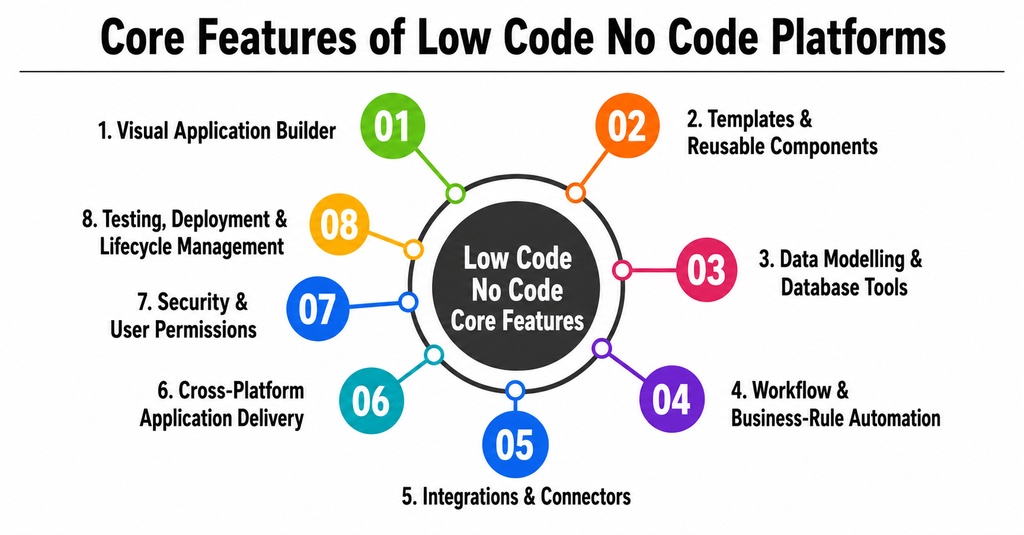
1. Visual Application Builder
The visual builder allows users to create screens, forms, menus, dashboards, and navigation using reusable components. Instead of manually coding a form, a user can drag input fields, buttons, and tables into an interface. Properties such as labels, validations, colours, and actions can be configured through panels or menus. This feature reduces repetitive front-end development and enables business stakeholders to review the application before the backend is fully developed.
2. Templates and Reusable Components
Templates provide ready-made structures for common use cases such as onboarding, approvals, asset tracking, help desks, and inspections. Reusable components can include navigation menus, authentication screens, calendars, charts, data tables, address fields, and payment interfaces. Templates accelerate the initial build, but organisations should confirm that they can be customised sufficiently.
3. Data Modelling and Database Tools
Applications require structured data. Low-code and no-code products normally provide visual database tools or connections to existing sources. Users may define tables, fields, relationships, validations, and calculated values without writing database queries. Data can also be connected from spreadsheets, cloud databases, enterprise applications, or APIs.
4. Workflow and Business-Rule Automation
Workflow tools allow users to define what should happen when a particular event occurs. A rule might state that when a customer submits a request, the platform must create a record, assign an owner, send an email, and notify a manager if the request is not handled within four hours. A low code automation platform may represent these processes visually through triggers, conditions, decisions, branches, approvals, and actions.
5. Integrations and Connectors
Applications rarely operate independently. They may need information from accounting systems, CRM software, payment providers, cloud storage, messaging tools, ERP systems, or internal databases. Low-code platforms usually provide prebuilt connectors and API tools. More advanced products support webhooks, custom APIs, data transformation, authentication, and enterprise integration patterns.
6. Cross-Platform Application Delivery
Many platforms allow the same project to produce responsive web, tablet, and mobile experiences. Some generate progressive web applications, while others support native Android and iOS publishing. Businesses should verify whether the result is genuinely native, a web application wrapped for mobile, or a responsive browser experience.
7. Security and User Permissions
Business applications require authentication, role-based access, data permissions, audit records, and secure integrations. Enterprise products may include single sign-on, encryption, environment controls, data-loss prevention, compliance tools, and policy management. The presence of security features does not automatically make an application secure; administrators must configure permissions correctly and govern external connectors.
8. Testing, Deployment, and Lifecycle Management
A serious development platform should support development, testing, and production environments. Important functions include version control, deployment approvals, rollback, application monitoring, error tracking, automated testing, and configuration management. Some enterprise platforms also integrate with conventional DevOps pipelines.
Advanced Features Reshaping the Market
1. AI-Assisted Application Generation
AI can help generate application foundations from natural-language instructions. A user might describe an inventory application with products, suppliers, low-stock alerts, and approval rules. The platform may then propose screens, data tables, relationships, and workflows. AI can reduce setup time, but generated applications require human review.
2. Intelligent Workflow Recommendations
Advanced systems can analyse a process and recommend automations, identify missing steps, or detect inefficient routing. AI may also generate formulas, translations, data models, unit tests, and interface elements.
3. Process Orchestration
Process orchestration coordinates work among employees, applications, AI systems, and automated workers. Instead of automating one isolated task, the platform manages an end-to-end process such as loan approval, insurance claims, customer onboarding, or procurement.
4. Robotic Process Automation
RPA is useful when an older system does not provide a suitable API. Software robots can perform repetitive interface actions such as copying information, updating records, or downloading reports. It should usually be treated as one automation method rather than the architecture of the entire application.
5. Custom-Code Extensions
The best low-code platform for a complex organisation should allow professional developers to extend the visual environment. Extensions may include JavaScript, custom widgets, backend services, API actions, specialised authentication, or reusable code packages.
6. AI Agents
AI agents can interpret information, make recommendations, and perform controlled actions within business processes. Enterprise adoption requires human oversight, permission controls, auditability, and clear operational boundaries.
How Low-Code and No-Code Development Works
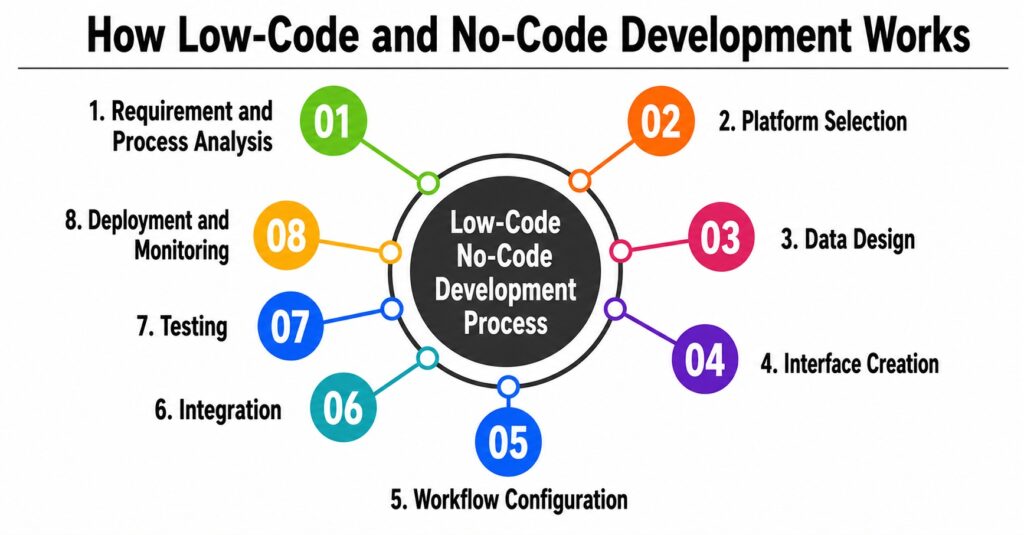
1. Requirement and Process Analysis
The team identifies users, objectives, workflows, data, integrations, permissions, and expected outcomes. Automating a poorly designed process only makes the inefficiency operate faster, so the workflow should be simplified before it is recreated digitally.
2. Platform Selection
The platform is selected according to application complexity, users, integrations, scalability, security, and budget. A simple departmental tool may work well on a no-code platform, while a mission-critical customer application may require enterprise low-code or conventional development.
3. Data Design
The team defines records, fields, relationships, ownership rules, and retention requirements. Existing data must be cleaned before migration because duplicate, incomplete, or inconsistent information can undermine an otherwise successful application.
4. Interface Creation
Screens and components are assembled visually. Designers or business users can participate directly because the interface is easier to understand than raw source code.
5. Workflow Configuration
Triggers, conditions, approvals, notifications, and actions are configured through the workflow builder. More complex logic may require formulas, expressions, or custom code.
6. Integration
The application connects with required systems through native connectors, APIs, webhooks, or integration platforms. Testing should cover authentication, error recovery, data ownership, and synchronisation conflicts.
7. Testing
The team performs functional, security, permission, performance, and user-acceptance testing. Low-code does not eliminate quality assurance; applications can still contain incorrect rules, weak permissions, and poor user experiences.
8. Deployment and Monitoring
After approval, the application is published to the selected web, mobile, or enterprise environment. Usage, errors, performance, automation failures, and security events should be monitored continuously.

Benefits of Low-Code and No-Code Development
1. Faster Time to Market
Reusable components and visual development reduce the time spent creating standard application functions. Teams can produce prototypes quickly, test them with users, and improve the application through shorter feedback cycles.
2. Better Business and IT Collaboration
Business experts understand operational problems, while developers understand architecture, security, and integration. Visual models give both groups a shared representation of the application.
3. Reduced Repetitive Development
Developers do not have to manually recreate authentication, data forms, common workflows, and deployment processes for every application. This allows technical specialists to spend more time on architecture, integration, and complex functionality.
4. Greater Access to Application Development
No-code allows domain experts to create tools without waiting for a complete software development project. Sustainable citizen-development programmes still require approved platforms, templates, data rules, and review processes.
5. Easier Prototyping and Experimentation
A working prototype is more useful than a static description. Teams can validate demand, workflows, and usability before investing in a larger implementation.
6. Faster Process Automation
Visual automation lets organisations replace spreadsheets, email-based approvals, and repeated data entry with structured workflows, improving visibility, consistency, and accountability.
Also Read: How to Develop AI Automation Software for Businesses in 2026: A Complete Guide
Limitations and Risks
1. Restricted Customisation
A platform may work well until the project requires a feature that its components or workflow engine cannot support. Customisation, integration, database management, and platform adoption are recurring challenges.
2. Vendor Lock-In
Applications may depend on proprietary workflows, data models, hosting, and components. Businesses should evaluate source-code export, data export, API access, migration options, and contractual termination terms.
3. Pricing at Scale
A platform that is affordable for ten users may become expensive for thousands of employees or customers. Charges may increase according to users, applications, records, storage, automation runs, API requests, or AI consumption.
4. Shadow IT
Uncontrolled citizen development can create applications that store sensitive information, duplicate existing tools, or operate without proper support. Central governance remains important even when the platform itself is easy to use.
5. Performance and Scalability
Simple tools may not support high transaction volumes, complex queries, real-time processing, or specialised workloads. Performance should be tested with realistic data and expected usage.
6. Security Misconfiguration
Visual development does not prevent users from creating broad permissions, exposing data, or connecting unapproved services. Security reviews remain necessary.
Top Low-Code and No-Code Platforms to Consider
| Platform | Best suited for | Key strength |
| Microsoft Power Apps | Microsoft-focused organisations and internal business apps | Deep Microsoft ecosystem integration |
| OutSystems | Complex and scalable enterprise applications | Enterprise lifecycle, governance, and modernisation |
| Mendix | Collaborative enterprise web and mobile development | Model-driven development and business-IT collaboration |
| Appian | Workflow-heavy and process-centric applications | Process orchestration and automation |
| Zoho Creator | SMBs and custom operational apps | Accessible web and mobile app creation |
| SAP Build | SAP-centric organisations | SAP data, process automation, and AI assistance |
| Google AppSheet | Data-driven internal apps and workflows | No-code applications built from business data |
| FlutterFlow | Design-rich cross-platform apps | Visual development with technical extensibility |
| Bubble | SaaS, marketplaces, and full-stack digital products | Integrated database, logic, hosting, and visual UI |
| Adalo / Glide | Prototypes and clearly defined business tools | Fast visual app creation for smaller teams |
1. Microsoft Power Apps
Best for organisations already using Microsoft 365, Dynamics 365, Dataverse, Azure, and related business systems. It supports low-code business applications, data connections, templates, and Power Platform automation.
2. OutSystems
Focused on enterprise applications, complex processes, system modernisation, and controlled deployment. It combines AI-assisted development, visual low-code tools, and enterprise governance.
3. Mendix

Suited to collaborative enterprise development, model-driven applications, and workflows involving business and IT teams. It also supports AI and agent-related development capabilities.
4. Appian

Particularly relevant for process-heavy applications. It combines low-code development, process orchestration, automation, and connected enterprise data.
5. Zoho Creator

An AI-powered low-code app development platform for custom web and mobile business applications. It provides drag-and-drop development, workflows, and integrations for business users and developers.
6. SAP Build

Well suited to organisations that use SAP applications and data. It supports application development, process automation, digital workspaces, AI assistance, and both low-code and pro-code development.
7. Google AppSheet

A no-code option for data-driven applications and workflow automation. It can generate prototypes from connected business data and supports visual configuration and spreadsheet-style expressions.
8. FlutterFlow

Useful for design-focused, cross-platform mobile, web, and desktop applications. It combines a visual environment with API integrations and greater technical customisation than many simple no-code tools.
9. Bubble

An AI-powered no-code platform for full-stack web and mobile products, including SaaS tools, marketplaces, and internal applications. It combines AI generation with visual editing, database functions, and workflow logic.
10. Adalo and Glide

Adalo is designed for database-driven iOS, Android, and web applications, while Glide focuses on rapidly building custom business applications. Both may suit smaller teams, prototypes, and clearly defined business tools.
Team Structure Required for Low-Code and No-Code Development
A small no-code project may be handled by one trained business user, but important applications require broader ownership. One person may cover several roles in a small company; nevertheless, business ownership, security, data quality, and long-term administration should always remain clear.
- Business owner: Defines the problem, expected outcomes, and business priorities.
- Product owner or business analyst: Translates operational needs into application requirements, workflows, and acceptance criteria.
- Low-code developer: Configures interfaces, data models, automation, and integrations.
- Professional developer: Builds custom extensions and complex integrations when required.
- Solution architect: Ensures the application fits the organisation’s wider technology environment.
- Data specialist: Manages data quality, migration, structure, and governance.
- Security specialist: Reviews access, privacy, compliance, and integration risk.
- Quality-assurance specialist: Tests workflows, permissions, usability, performance, and reliability.
- Platform administrator: Manages environments, licences, policies, users, and application lifecycle.
Also Read: How Startups Can Build Successful Mobile Apps in 2026
Pricing Models and Total Cost of Ownership
Low-code and no-code vendors commonly use several pricing methods. The subscription is only one part of the expense. Total cost should also include implementation, migration, integration, training, governance, support, premium connectors, storage, AI usage, and future platform changes.
- Per-user model: Charges for every person who builds or uses an application.
- Per-application model: Charges according to the number of deployed applications.
- Usage-based model: Calculates fees from records, storage, automation runs, messages, API calls, or AI credits.
- Tiered subscription model: Reserves advanced security, integrations, automation, and governance for higher plans.
- Enterprise agreement: Combines platform capacity, support, compliance, and negotiated usage.
Conclusion
Low-code and no-code development are becoming important parts of modern software delivery. No-code makes application creation more accessible to business users and is especially useful for internal tools, prototypes, simple workflows, and clearly defined applications. Low-code provides greater extensibility and is better suited to enterprise processes, integrations, modernisation projects, and applications that require professional technical control.
The right decision should be based on the problem rather than the popularity of a platform. Businesses must assess application complexity, expected users, integrations, security, scalability, pricing, governance, and exit options. The strongest low-code/no-code platforms combine visual speed with reliable data management, automation, integration, security, and lifecycle controls.
AI will make these environments increasingly powerful, but it will not remove the need for clear requirements, testing, architecture, human oversight, and accountability. Organisations that combine visual development with disciplined governance will be best positioned to capture the speed of low-code and no-code without creating avoidable operational risk.
FAQ
Que 1. What is the main difference between low-code and no-code?
Answer 1: Low-code reduces manual development while allowing custom code for specialised functions. No-code is intended to let users build applications through visual tools without writing conventional code. Low-code generally offers greater flexibility, while no-code is easier for non-technical users.
Que 2. Can low-code replace traditional software development?
Answer 2: Low-code can replace or accelerate traditional development for many business applications, portals, and workflows. Traditional development remains appropriate for highly specialised systems, unusual performance requirements, advanced algorithms, and applications that require complete infrastructure or source-code control.
Que 3. Which is the best low-code platform?
Answer 3: There is no single best platform for every business. Microsoft Power Apps may fit a Microsoft-focused organisation; OutSystems or Mendix may suit complex enterprise development; Appian may fit process automation, and FlutterFlow may be appropriate for customised cross-platform applications.
Que 4. Are no-code applications secure?
Answer 4: They can be secure when the platform provides suitable controls and the application is configured correctly. Businesses should examine authentication, permissions, encryption, audit logs, data location, backups, compliance, and connector governance.
Que. 5 How should a business choose between low-code and no-code platforms?
Answer 5: The business should define the application requirements, users, data, integrations, security, scalability, and budget. It should then conduct a proof of concept using realistic workflows and data before selecting a platform.