Introduction
Customers communicate with businesses through websites, emails, telephone calls, advertisements, social media, chat, online meetings, physical stores, and support channels. When the information produced by these interactions remains scattered across spreadsheets, inboxes, and disconnected applications, employees cannot see the complete relationship. Leads are missed, customers repeat information, managers struggle to forecast revenue, and service teams respond without enough context.
A customer relationship management platform solves this problem by bringing customer profiles, communication history, sales opportunities, marketing activity,y and service records into one organised environment. Selecting a CRM Solution for Your Business is therefore not merely a software purchase. It is a decision about how the organisation will manage customer data, coordinate teams, automate work and measure growth.
The best CRM is not automatically the product with the longest feature list or the largest market share. It is the platform that matches the company’s customer journey, sales process, integration needs, security obligations, budget and internal capabilities. This guide explains the market opportunity, essential and advanced features, selection criteria, implementation approach, required team, and pricing considerations that should shape the final decision.
CRM Market Statistics, Current Value and Growth Potential
The CRM market is expanding as organisations invest in cloud software, customer experience, artificial intelligence, automation, and data-driven sales management. Published market estimates vary because some research firms measure CRM software alone while others include customer-service platforms, marketing technology, analytics, and implementation services. For that reason, decision-makers should compare the methodology behind each estimate rather than treating one figure as universally definitive.
| Metric | Current / Base | Forecast | Growth Indicator |
| Global CRM market | USD 112.91B (2025) | USD 126.17B (2026) | Approx. 11.7% YoY |
| Long-term global outlook | USD 126.17B (2026) | USD 320.99B (2034) | Approx. 12.4% CAGR |
| Alternative global estimate | USD 86.4B (2026) | USD 161.3B (2033) | Approx. 9.3% CAGR |
| India CRM market | USD 3.49B (2025) | USD 9.10B (2033) | Approx. 12.8% CAGR |
| Cloud CRM share | 80.16% of revenue (2025) | Cloud remains dominant | Cloud-led adoption |
Fortune Business Insights estimated the global CRM market at approximately USD 112.91 billion in 2025 and USD 126.17 billion in 2026. That implies an estimated year-over-year rise of about 11.7%. Its longer-term forecast places the market at roughly USD 320.99 billion by 2034, representing a compound annual growth rate of approximately 12.4%.
Grand View Research uses a narrower market definition and estimates USD 79.6 billion for 2025, USD 86.4 billion for 2026, and approximately USD 161.3 billion by 2033, with a projected CAGR of about 9.3%. The difference between these studies reinforces an important lesson: the direction of growth is clear, but the absolute market value depends on what each report includes.
Cloud deployment remains a major growth driver. Mordor Intelligence reported that cloud CRM solutions represented approximately 80.16% of CRM revenue in 2025. In India, Grand View Research estimated a market value of approximately USD 3.49 billion in 2025, potentially reaching USD 9.10 billion by 2033 at a CAGR of about 12.8%. These forecasts suggest continued investment in mobile access, subscription software, automation, unified customer data and AI-enabled decision support.
How a CRM Solution for Your Business Works
A CRM begins by collecting customer and prospect information from forms, advertisements, email, phone calls, meetings, events, chat, social channels, e-commerce platforms,s and imported records. It uses this information to create or update contacts, company accounts, leads, sales opportunities, and service cases. Every relevant interaction can then be associated with the correct customer record.
When a prospect submits an enquiry, the CRM can record the lead source, assign the person to a suitable sales representative, send an acknowledgement, and create a follow-up task. As the opportunity progresses, the system tracks its stage, value, expected closing date, stakeholders, products, activities, and documents. Marketing teams can review campaign engagement, while service teams can see purchases, complaints, ts and support history.
Automation rules can route leads, schedule reminders, request approvals, update fields, trigger nurturing sequences, and escalate unresolved service issues. Dashboards convert this activity into pipeline, conversion, forecast, cash, and performance insight. When integrated correctly, the CRM becomes a shared operating system for customer-facing teams rather than an isolated contact database.
Core Features to Look for in a CRM Solution for Your Business
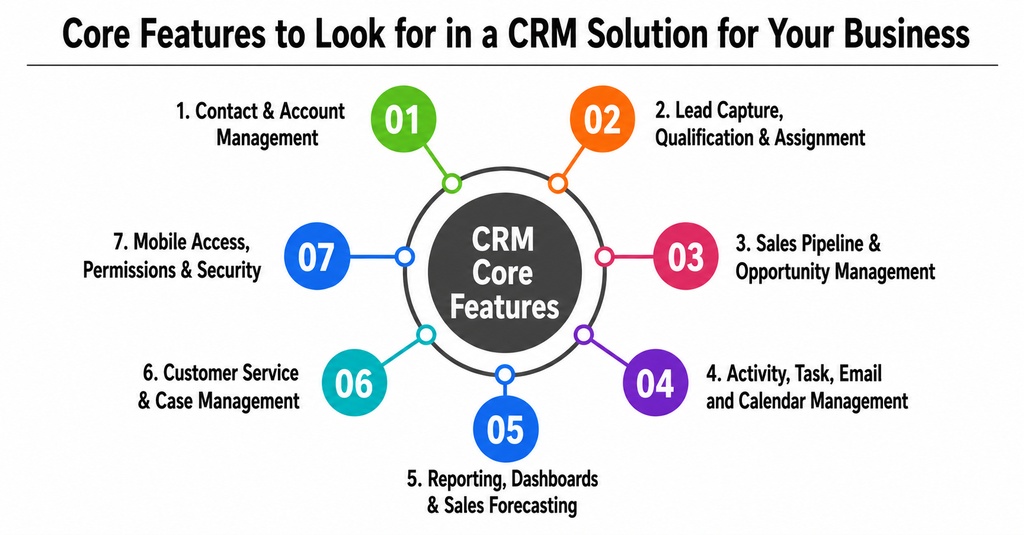
1. Contact and Account Management
Contact management stores names, email addresses, telephone numbers, job titles, organisations, communication preferences, notes, documents, and interaction history. B2B companies should also be able to connect several contacts to one account and identify decision-makers, influencers, users, and billing stakeholders. Duplicate detection, searchable fields, validation, and consent information are essential for maintaining reliable records.
2. Lead Capture, Qualification, and Assignment
The CRM should capture enquiries from forms, imports, campaigns, events, chat, and referrals. It should support qualification criteria and route leads according to territory, language, product, industry, workload, or other business rules. Clear ownership and follow-up deadlines help prevent valuable enquiries from remaining unanswered.
3. Sales Pipeline and Opportunity Management
Pipeline management represents the sales process as visible stages such as new enquiry, qualified, demonstration, proposal, negotiation, won, or lost. Each opportunity should show value, probability, products, close date, stakeholders, activities, and next action. Multiple pipelines are useful when the organisation has different business units, products or sales motions.
4. Activity, Task, Email, and Calendar Management
Users should be able to create calls, meetings, notes, reminders, and follow-up tasks without leaving the customer record. Email and calendar integration should connect communication with the correct contact and deal, support templates, and reduce manual logging. The goal is to create an accurate timeline that remains useful even when responsibility moves from one employee to another.
5. Reporting, Dashboards, and Sales Forecasting
Standard reporting should measure lead source, stage conversion, pipeline value, win rate, average deal size, sales-cycle length, representative performance, and expected revenue. Different roles require different dashboards. A sales representative may need today’s tasks and open deals, while senior management may require consolidated forecast, conversion and business-unit performance information.
6. Customer Service and Case Management
Many modern CRMs include ticketing, queues, service-level rules, escalation, knowledge bases, es and customer portals. Connecting service data to sales and marketing records gives employees the context needed to respond intelligently. A support agent can review products, previous issues, contractual status, and current opportunities before contacting the customer.
7. Mobile Access, Permissions and Data Security
Mobile CRM enables field and remote teams to search records, prepare for meetings, log calls, and update opportunities. Security capabilities should include role-based permissions, field-level access, audit logs, multi-factor authentication, encryption, backup controls, and retention policies. Sensitive customer information must be available to the right users without becoming broadly exposed.
Advanced CRM Features That Can Create a Competitive Advantage
1. Predictive Lead and Opportunity Scoring
Predictive scoring uses historical patterns to estimate the likelihood that a lead will qualify or an opportunity will close. It can help sales teams prioritise attention and identify risk earlier. However, predictive models depend on clean, representative data. A sophisticated algorithm cannot repair incomplete records or a badly defined sales process.
2. Generative AI Assistants and Recommended Next Actions
AI assistants can summarise customer records, prepare meeting briefs, draft emails, analyse calls and recommend next steps. More advanced systems may use controlled agents to complete multi-step work. Buyers should examine accuracy, human approval, permission boundaries, data usage, and the cost of AI credits. AI should support employees and improve consistency without creating unmonitored decisions around sensitive customer data.
3. Workflow Automation and Process Orchestration
Advanced workflow builders use triggers, conditions, delays, branches and approvals to automate lead routing, follow-up, deal transitions, customer onboarding, renewal and service escalation. The platform should provide testing, version control, failure alerts, and clear usage limits. Automation must simplify the process rather than hide an unnecessarily complicated workflow.
3. Omnichannel Engagement and Conversation Intelligence
An omnichannel CRM can combine email, telephony, chat, social messaging, and support communication into one timeline. Conversation intelligence may transcribe calls and identify questions, objections, sentiment, competitor mentions, and commitments. These capabilities are valuable for coaching and quality monitoring, but companies must also review consent, recording laws, language accuracy, storage and access controls.
4. Customer Journey, Health Scores and Churn Prediction
Journey orchestration coordinates actions across marketing, sales, onboarding, service, renewal, and loyalty. Customer-health models can combine engagement, purchasing, service, and product-usage signals to identify at-risk accounts. These tools are particularly useful for subscription businesses, but their recommendations are only as dependable as the connected operational data.
5. Custom Objects, Low-Code Tools, and Open Integrations
Some organisations must manage specialised entities such as properties, policies, memberships, vehicles, treatments, courses or subscriptions. Custom objects and low-code tools allow the CRM to represent these requirements without forcing every process into a generic deal. Open APIs, webhooks, and integration platforms are equally important when the CRM must connect with ERP, accounting, e-commerce, payments, analytics, and internal databases.
The Main USP of a Modern CRM Platform
This shared view helps sales representatives understand buying interest and past communication, enables marketing teams to create more relevant segments, gives service employees access to purchase and complaint history, and provides management with consistent pipeline information. Customers benefit because they do not have to repeat the same story to every department.
The value is not created by storing the largest possible volume of data. It comes from making accurate information available at the moment of action. The right CRM Solution for Your Business should therefore improve decisions, handovers, response time, and customer relevance, not merely increase the number of fields employees must complete.
Special CRM Features Worth Prioritising
- Automated activity capture for email, meetings, and calls.
- Relationship intelligence that identifies engagement strength and inactive stakeholders.
- Next-best-action recommendations based on context and deal stage.
- Configure, Price, Quote tools for complex products, discounts,s and approvals.
- Territory, quota, and partner-management capabilities.
- Customer and partner portals for secure self-service.
- Industry templates for common workflows and terminology.
- Sandbox environments for safe testing before production release.
- Data-quality tools for duplicate prevention, validation and standardisation.
- Offline mobile capability for field employees with unreliable connectivity.
How to Select the Best CRM Solution for Your Business
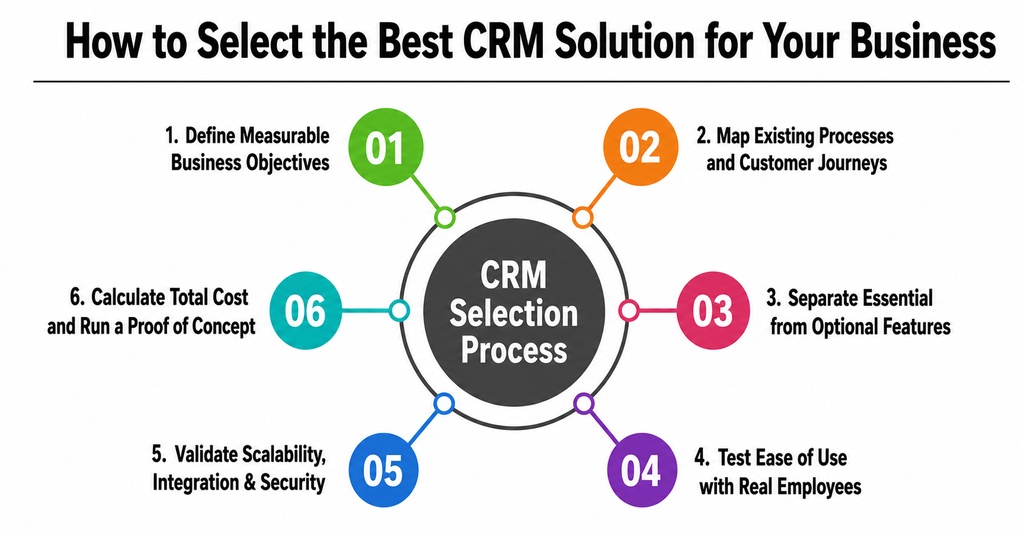
1. Define Measurable Business Objectives
Begin with outcomes rather than vendor names. The business may want to shorten lead response time, improve conversion, create dependable forecasts, centralise customer data, automate follow-up, or reduce service resolution time. Each objective should have a measurable indicator so that success can be evaluated after implementation.
2. Map Existing Processes and Customer Journeys
Document how the organisation currently handles enquiries, opportunities, quotations, orders, onboarding, complaints and renewals. Identify manual work, duplicated entry, delays, unclear ownership, and missing information. A CRM should improve the process rather than reproduce every inefficiency in digital form.
3. Separate Essential Requirements from Optional Features
Classify requirements as mandatory for launch, important for the next phase, and optional for later. This prevents the evaluation from being controlled by impressive features that do not support a genuine business need. It also helps the company implement a manageable first version and expand it as adoption improves.
4. Test Ease of Use with Real Employees
A powerful platform creates little value when people avoid using it. Ask sales, marketing, and service users to test search, record creation, activity logging, dashboards, mobile access, and daily workflows. Their feedback can reveal practical problems that may not appear during a polished vendor demonstration.
5. Validate Scalability, Integration, and Security
Examine how the platform handles growth in users, records, storage, countries, currencies, pipelines, and automation. List every system that must exchange information with the CRM and define the owner of each data type. Security review should cover authentication, encryption, data location, backups, audit trails, retention, deletion, consent,t and incident response.
6. Calculate Total Cost and Run a Proof of Concept
The licence fee is only one component of the cost. Include implementation, migration, integration, premium support, storage, messaging, telephony, AI usage, consulting, administration, training, and marketplace applications. Shortlisted platforms should then be tested with realistic records and workflows. Score the results against predetermined criteria instead of relying on the vendor with the most attractive presentation
CRM Implementation and Customisation Process
Most companies should configure an established CRM rather than build a complete platform from the beginning. A structured implementation reduces risk and improves adoption.
1. Discovery and requirements:
Interview stakeholders, map processes, define goals, identify reports, document integrations and prioritise requirements.
2. Solution design:
Design the data model, pipeline stages, roles, permissions, dashboards, workflows, and migration approach.
3. Configuration and limited customisation:
Use standard functionality wherever practical and create custom components only when they support a clear business need.
4. Data cleaning and migration:
Remove duplicates, standardise formats, define mandatory information, archive unnecessary records and test migration mappings.
5. Integration:
Connect required applications and define synchronisation, ownership, frequency, security, monitoring and error recovery.
6. Testing:
Perform functional, integration, permission, migration, performance, and user-acceptance testing.
7. Training and change management:
Teach role-specific workflows, explain the reasons for change, and provide practical documentation.
8. Controlled launch and optimisation:
Begin with a manageable team or process, monitor adoption, and improve data quality, automation, and reports over time.
Required Team Structure for CRM Implementation
A successful CRM programme requires both business ownership and technical capability. In a smaller organisation, one person may cover several roles, but responsibilities should remain explicit.
- Executive sponsor: Provides authority, budget and support for organisational change.
- Business or product owner: Prioritises requirements and remains accountable for business outcomes.
- Project manager: Coordinates scope, timeline, resources, risks, vendors, and communication.
- CRM business analyst: Documents processes, fields, workflows, reports, and acceptance criteria.
- CRM administrator: Manages users, permissions, layouts, automation, reports, and routine improvements.
- Solution architect or technical lead: Designs data, integration, security, and scalability.
- Developer or low-code specialist: Creates custom components when configuration is insufficient.
- Integration and data specialists: Connect systems, clean records, migrate information, and validate quality.
- Quality-assurance specialist: Tests functionality, permissions, migration, integrations, and workflows.
- Security, compliance, and change leads: Review risk, privacy, training, communication, and long-term adoption.
CRM Pricing Models and Total Cost of Ownership
Pricing is more relevant to a CRM buyer than generic software monetisation methods. Vendors usually combine several charging models, so the organisation should request a three- to five-year projection based on expected growth.
- Per-user subscriptions: monthly or annual charges for each authorised user.
- Tiered editions: free, starter, professional, and enterprise plans with increasing capability.
- Usage-based charges: fees for contacts, storage, emails, calls, messages, API requests, AI credits or automation runs.
- Module-based pricing: separate charges for sales, marketing, service, commerce, or analytics products.
- Premium models: basic functionality at no cost with paid limits, features, and support.
- Implementation and consulting: setup, migration, integration, customisation, training and optimisation services.
The lowest advertised price may not be the lowest long-term cost. A platform can become expensive when essential automation, permissions, reporting, or integrations require premium plans. Conversely, a higher licence price may be justified when it reduces manual administration, replaces several tools or accelerates implementation.
Common CRM Selection Mistakes to Avoid
- Buying a platform before defining business objectives and processes.
- Selecting a product because it is well known or heavily advertised.
- Comparing feature quantity instead of user adoption and business outcomes.
- Migrating inaccurate, duplicated, or unnecessary data.
- Over-customising the system and making upgrades difficult.
- Ignoring integration, privacy, security, and data-governance requirements.
- Underestimating training, communication, and process change.
- Failing to assign a long-term CRM owner and administrator.
- Measuring project completion instead of conversion, response, forecast, and customer improvements.
- Comparing only first-year licence prices rather than the total cost of ownership.

Conclusion
Selecting a CRM Solution for Your Business is an operational and strategic decision. The chosen platform may influence how the organisation captures demand, manages opportunities, communicates with customers, resolves issues, predicts revenue, and measures performance for many years.
The right solution should provide dependable contact management, lead handling, pipeline visibility, communication tracking, reporting, mobile access, security, and integration. Advanced capabilities such as predictive scoring, generative AI, workflow automation, omnichannel engagement, conversation intelligence and customer-health scoring should be selected according to practical business value rather than novelty.
Begin with measurable objectives, map the customer journey, prioritise requirements, involve real users, test integrations, calculate total ownership cost and run a realistic proof of concept. The best CRM is not the platform with the greatest number of features. It is the one employees consistently use, managers can trust, customers benefit from, and the business can adapt as it grows.
Frequently Asked Questions
1. What is the most important feature of a CRM?
The most important capability is a reliable and unified customer record. Automation, analytics, and AI depend on accurate data. The CRM should make contacts, communication, opportunities, purchases, issues, and next actions visible to authorised users in one place.
2. How much does a CRM solution cost?
Cost depends on users, subscription tier, contacts, storage, integrations, automation, communication channels, AI consumption, implementation and support. Compare a three- to five-year total cost instead of relying on the advertised monthly licence price.
3. How long does CRM implementation take?
A small standard implementation can be completed relatively quickly, while a multi-department programme with complex migration, integration and security requirements may require several phases. Scope, data quality, decision speed, and testing determine the realistic timeline.
4. Should a small business use a free CRM?
A free CRM can be suitable for basic contact, task, deal, and communication management. Before adoption, review user limits, automation, reporting, support, integrations, data export, and the future cost of upgrading.
5. Is it better to buy or develop a CRM?
Most organisations should buy an established platform and configure it around their processes. Custom development is appropriate only when specialised workflows, regulation, scale or intellectual property cannot be supported by standard products and the business can fund continuous security, maintenance and improvement.