The digital transformation of education has accelerated rapidly over the past decade, and in 2026, education apps have become a cornerstone of modern learning. From school students to working professionals, millions of users now rely on mobile applications for learning, skill development, and career advancement.
This rapid evolution has significantly boosted the demand for Education App Development 2026, where businesses and institutions are building intelligent, scalable, and user-centric learning platforms. Modern education apps are no longer limited to basic content delivery — they integrate AI-driven personalization, gamification, real-time analytics, and interactive learning experiences. By leveraging advanced technologies and cloud infrastructure, companies can create powerful digital ecosystems that enhance accessibility, improve engagement, and deliver measurable learning outcomes in today’s competitive edtech landscape.
Education app development is no longer limited to simple video-based platforms. Today’s apps integrate AI-driven personalization, gamification, real-time analytics, and immersive technologies to create engaging and effective learning experiences.
In a world where users demand flexibility, accessibility, and interactive learning, building an education app presents a massive opportunity for startups, edtech companies, and enterprises alike. Whether it’s language learning, competitive exam preparation, or corporate training, education apps are reshaping how knowledge is delivered and consumed.
Market Stats
An education app industry is one of the fastest-growing segments within the broader edtech ecosystem. Driven by digital transformation, increased smartphone usage, and demand for flexible learning, the market is experiencing exponential growth across regions and user segments.
📊 Global Education App Market Size
The global education app market has witnessed significant expansion in recent years:
- The market was valued at approximately USD 7.6 billion in 2025 and is expected to reach USD 43 billion by 2034, growing at a CAGR of 21.29%.
- Another estimate suggests the market could grow even further to USD 234 billion by 2035, reflecting strong long-term potential.
This rapid growth highlights the increasing reliance on mobile-based learning solutions across academic and professional domains.
📈 E-Learning Market Growth (Wider Ecosystem)
Education apps are part of the broader e-learning industry, which is expanding at an equally impressive pace:
- The global e-learning market reached USD 325 billion in 2025 and is projected to hit USD 665 billion by 2031.
- Growth rates range between 12% to 24% CAGR, depending on the segment and region.
- The online education segment alone is expected to grow at a CAGR of 23.7%, fueled by AI and digital adoption.
This indicates that education apps are not just a niche — they are a core component of a massive, evolving digital economy.
📊 Adoption & User Behavior Trends
The widespread adoption of education apps is driven by changing user preferences:
- Over 65% increase in global adoption of education apps has been recorded in recent years.
- Nearly 48% growth in mobile learning adoption shows a strong shift toward mobile-first education.
- More than 39% increase in AI-powered learning tools highlights the demand for personalized education.
Users now prefer:
- On-demand learning
- Self-paced courses
- Mobile accessibility
- Personalized recommendations
🌍 Regional Market Insights
The education app market shows strong regional diversity:
- North America leads with around 35–36% market share, driven by advanced infrastructure and high edtech investment.
- Asia-Pacific is the fastest-growing region due to:
- Large student population
- Affordable smartphones
- Growing internet penetration
- Countries like India, China, and Southeast Asia are emerging as major markets for education apps.
🚀 Key Growth Drivers
Several factors are accelerating the growth of education app development:
1. Smartphone & Internet Penetration
The availability of affordable smartphones and high-speed internet has made learning accessible to millions globally.
2. Demand for Flexible Learning
Users prefer learning at their own pace, anytime and anywhere — a major advantage of mobile apps.
3. Rise of Skill-Based Learning

There is increasing demand for:
- Professional courses
- Upskilling programs
- Certification-based learning
4. AI & Personalization
AI-driven learning paths, recommendations, and analytics are transforming user experiences.
5. Government & Institutional Support
Many governments are promoting digital education initiatives, boosting adoption rates.
📊 Industry Segments Driving Growth
Education apps are widely used across multiple segments:
| Segment | Growth Insight |
| K-12 Education | Massive adoption for school learning |
| Higher Education | Universities integrating digital tools |
| Corporate Training | Rapid growth in upskilling platforms |
| Test Prep Apps | High demand in competitive exam markets |
| Language Learning | One of the fastest-growing niches |
🔮 Future Trends & Predictions
The future of education apps looks highly promising, with several trends shaping the industry:
- AI-powered tutors and automation will become standard
- AR/VR will enable immersive learning experiences
- Microlearning (short lessons) will dominate content formats
- Blockchain-based certifications will gain adoption
- Integration with job platforms will increase
📌 Key Market Takeaways
✔ Education apps are growing at 15–21%+ CAGR globally
✔ The market could exceed USD 200+ billion by 2035
✔ Mobile-first learning is becoming the global standard
✔ AI and personalization are key differentiators
✔ Asia-Pacific is the fastest-growing region
🎯 Final Insight
The education app market is not just growing — it is transforming the global education system. For businesses and startups, this presents a massive opportunity to build scalable, innovative, and impactful learning platforms.
Core Features of Education App Development 2026
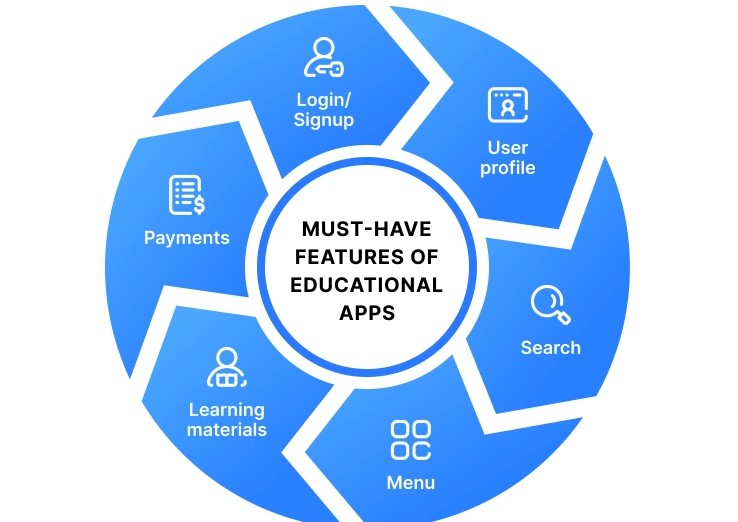
To build a successful education app, you must include essential features that ensure usability, engagement, and scalability.
👤 User Registration & Profiles
- Secure login (email, OTP, social login)
- Personalized dashboards
- Learning history
📚 Course Management System
- Course categorization
- Enrollment system
- Multi-format content (videos, PDFs, quizzes)
🎥 Video Learning Module
- HD streaming
- Playback controls
- Offline downloads
📝 Assessments & Quizzes
- Tests and assignments
- Instant feedback
- Score tracking
📊 Progress Tracking
- Completion rates
- Performance analytics
- Learning insights
🔔 Push Notifications
- Reminders
- New content alerts
- Deadlines
💳 Payment Integration
- Subscriptions
- One-time purchases
- Secure transactions
⭐ Ratings & Reviews
- Course feedback
- Instructor ratings
👨🏫 Instructor Dashboard
- Content upload
- Student management
- Performance insights
Advanced Features of Education App Development 2026
As the education app market becomes increasingly competitive, basic functionality is no longer enough. To stand out and deliver real value, modern education apps must incorporate advanced technologies that enhance personalization, engagement, and learning outcomes.
These advanced features not only improve user experience but also drive higher retention, better performance, and long-term scalability.
🤖 1. AI-Powered Personalization
Artificial Intelligence is revolutionizing how users consume educational content.
Key functionalities:
- Personalized course recommendations based on user behavior
- Adaptive learning paths that adjust difficulty levels
- Smart content suggestions based on progress and interests
- Learning pace optimization
Why it matters:
Every learner is different. AI ensures a customized experience, increasing engagement and completion rates.
🧠 2. AI Tutors & Intelligent Chatbots
AI-driven tutors act as 24/7 assistants for learners.
Key functionalities:
- Instant doubt resolution
- Context-aware responses
- Conversational learning support
- Voice-enabled AI assistance
Why it matters:
Provides immediate help without waiting for instructors, improving user satisfaction and learning continuity.
🎮 3. Gamification & Reward Systems
Gamification transforms learning into an engaging experience.
Key functionalities:
- Points, badges, and achievements
- Leaderboards for competition
- Daily streaks and milestones
- Reward-based progression systems
Why it matters:
Gamification increases motivation, engagement, and retention by making learning fun and interactive.
🧪 4. Education App Development 2026
Augmented Reality (AR) and Virtual Reality (VR) provide experiential learning.
Key functionalities:
- Virtual classrooms and labs
- 3D simulations and models
- Interactive real-world scenarios
- Hands-on practical learning
Why it matters:
Enhances understanding of complex subjects and improves knowledge retention through immersive experiences.
📡 5. Live Classes & Real-Time Interaction
Live learning is essential for engagement and real-time collaboration.
Key functionalities:
- Live video streaming classes
- Real-time chat and Q&A
- Screen sharing and whiteboard tools
- Session recording for later access
Why it matters:
Brings the traditional classroom experience into digital platforms.
📊 6. Advanced Learning Analytics & Insights
Data-driven insights help improve both user experience and platform performance.
Key functionalities:
- Detailed performance reports
- Learning behavior tracking
- Predictive analytics (dropout risk, engagement levels)
- Course effectiveness analysis
Why it matters:
Helps educators optimize content and enables learners to track progress more effectively.
📥 7. Offline Learning with Smart Sync
Offline functionality ensures accessibility for all users.
Key functionalities:
- Downloadable content (videos, PDFs)
- Offline quizzes
- Auto-sync when internet reconnects
Why it matters:
Critical for users in low-connectivity regions, increasing app usability.
🌐 8. Multi-Language & Localization Support
Global accessibility requires localization.
Key functionalities:
- Multi-language interface
- Regional content adaptation
- Subtitles and voice translations
Why it matters:
Expands user base and improves accessibility across different regions.
🔐 9. Blockchain-Based Certifications
Blockchain technology ensures secure and verifiable credentials.
Key functionalities:
- Tamper-proof certificates
- Digital credential verification
- Shareable certificates
Why it matters:
Builds trust and credibility for learners and employers.
🤝 10. Social Learning & Community Features
Learning is more effective when it’s collaborative.
Key functionalities:
- Discussion forums
- Peer-to-peer interaction
- Study groups
- Community challenges
Why it matters:
Encourages collaboration, networking, and peer learning.
🧩 11. Microlearning & Bite-Sized Content
Short lessons are becoming increasingly popular.
Key functionalities:
- Short video lessons (2–10 minutes)
- Daily learning modules
- Quick assessments
Why it matters:
Improves retention and fits into users’ busy schedules.
🎯 12. Skill Mapping & Career Integration
Modern education apps focus on outcomes, not just content.
Key functionalities:
- Skill tracking dashboards
- Career path recommendations
- Job matching integrations
- Resume-building tools
Why it matters:
Aligns learning with real-world career opportunities.
🔄 13. AI-Based Smart Revision System
Helps users retain knowledge effectively.
Key functionalities:
- Spaced repetition algorithms
- Personalized revision schedules
- Weak area identification
Why it matters:
Improves long-term knowledge retention and exam performance.
🎙️ 14. Voice Search & Voice Learning
Voice technology is gaining popularity.
Key functionalities:
- Voice-based navigation
- Audio learning modules
- Speech-to-text features
Why it matters:
Enhances accessibility and enables hands-free learning.
⚡ 15. Education App Development 2026
Education apps are expanding beyond smartphones.
Key functionalities:
- Smartwatch notifications
- Learning reminders
- Fitness-based learning triggers
Why it matters:
Creates a more connected and seamless user experience.
📌 Summary of Advanced Features
To build a future-ready education app in 2026, you should integrate:
✔ AI-driven personalization
✔ Gamification and engagement tools
✔ AR/VR immersive learning
✔ Real-time live classes
✔ Advanced analytics
✔ Offline learning capabilities
✔ Blockchain certification
✔ Social and collaborative learning
🎯 Final Insight
Advanced features are what differentiate a basic education app from a market leader. By leveraging AI, immersive technologies, and data-driven insights, you can create a highly engaging, scalable, and future-proof learning platform.
These features not only enhance user satisfaction but also significantly improve retention, monetization, and overall platform success.
Education App Development 2026
Building a successful education app in 2026 requires a structured, strategic, and user-centric development approach. From idea validation to post-launch scaling, every phase plays a critical role in ensuring the app is functional, scalable, and competitive in the market.
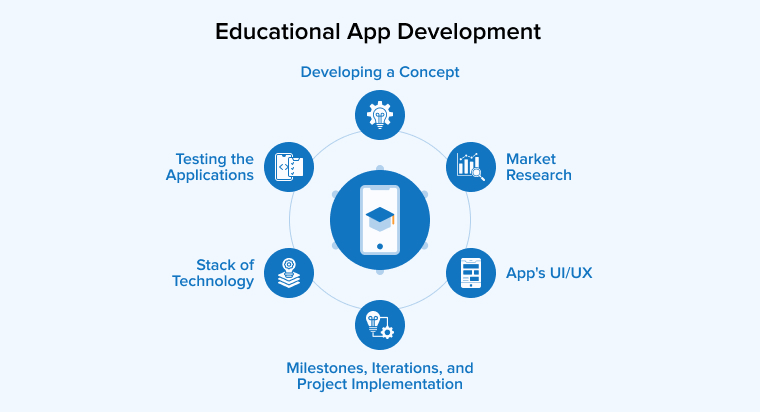
Below is a comprehensive breakdown of the complete development lifecycle.
🔍 Phase 1: Market Research & Idea Validation
Before writing a single line of code, it’s essential to validate your idea.
Key activities:
- Identify your target audience (students, professionals, institutions)
- Analyze competitors (Duolingo, BYJU’S, Coursera, Udemy)
- Identify market gaps and opportunities
- Define your niche (language learning, K-12, test prep, corporate training)
- Validate demand through surveys, MVP testing, or pilot programs
Deliverables:
- Product vision
- Unique Value Proposition (USP)
- Feature prioritization list
Why it matters:
Skipping this step can lead to building a product with no real demand.
🧩 Phase 2: Define MVP & Feature Roadmap
Instead of building a full-featured app, start with an MVP (Minimum Viable Product).
Key activities:
- Identify must-have features (video lessons, login, payment)
- Prioritize features using MoSCoW method (Must, Should, Could, Won’t)
- Define short-term and long-term roadmap
- Estimate timelines and budget
MVP Goal:
Launch quickly, test with real users, and iterate based on feedback.
🎨 Phase 3: UI/UX Design
User experience is critical in education apps, where engagement directly impacts retention.
Key activities:
- Create user journey maps
- Design wireframes (low-fidelity layouts)
- Build interactive prototypes (Figma, Adobe XD)
- Focus on intuitive navigation and accessibility
- Ensure mobile-first and responsive design
Best practices:
- Keep UI clean and distraction-free
- Use gamification elements visually
- Optimize for different age groups
Why it matters:
A poor UX can lead to high drop-off rates, regardless of content quality.
⚙️ Phase 4: Technology Stack Selection
Choosing the right technology stack ensures scalability and performance.
Frontend:
- Flutter / React Native (cross-platform)
- Swift (iOS), Kotlin (Android)
Backend:
- Node.js, Django, Laravel
Database:
- PostgreSQL, MongoDB
Cloud & Hosting:
- AWS, Google Cloud, Azure
Other Integrations:
- Video streaming (AWS Media Services, Vimeo)
- AI/ML tools (Python, TensorFlow)
- Payment gateways (Stripe, Razorpay)
Why it matters:
The right tech stack reduces future scalability issues and development costs.
💻 Phase 5: App Development (Frontend & Backend)
This is the core execution phase where the app is built.
Frontend Development
- Build user interface for mobile/web
- Integrate UI designs into functional screens
- Optimize performance and responsiveness
Backend Development
- Develop APIs (user, courses, payments, analytics)
- Implement authentication & security
- Manage database and server logic
- Enable real-time features (notifications, tracking)
Module Development
- Student app
- Instructor panel
- Admin dashboard
Why it matters:
A robust backend ensures seamless performance and scalability.
🔗 Phase 6: Third-Party Integrations
Integrations enhance functionality and reduce development effort.
Common integrations:
- Payment gateways (Stripe, PayPal, Razorpay)
- Video hosting services
- Push notification services (Firebase)
- Email/SMS services
- Analytics tools (Google Analytics, Mixpanel)
Why it matters:
These integrations enable critical features like payments, communication, and tracking.
🧪 Phase 7: Testing & Quality Assurance
Testing ensures the app is bug-free and performs well under different conditions.
Types of testing:
- Functional testing
- Usability testing
- Performance testing
- Security testing
- Compatibility testing (devices, OS versions)
Tools used:
- Selenium
- Appium
- TestFlight (iOS beta testing)
Why it matters:
Poor app performance can lead to negative reviews and user churn.
🚀 Phase 8: Deployment & Launch
Once testing is complete, the app is ready for release.
Steps:
- Deploy backend on cloud servers
- Submit app to Google Play Store & Apple App Store
- Ensure compliance with app store guidelines
- Set up analytics and crash reporting tools
Soft Launch Strategy:
- Release in a limited region
- Collect user feedback
- Fix issues before full launch
📈 Phase 9: Post-Launch Monitoring & Optimization
Development doesn’t end at launch — continuous improvement is key.
Key activities:
- Monitor user behavior using analytics
- Track KPIs (retention, engagement, conversions)
- Fix bugs and performance issues
- Release regular updates
- Optimize features based on user feedback
Why it matters:
Continuous improvement ensures long-term success and scalability.
🔄 Phase 10: Scaling & Feature Expansion
Once the app gains traction, focus on scaling.
Scaling strategies:
- Add advanced features (AI, AR/VR, gamification)
- Expand to new regions and languages
- Improve infrastructure for higher traffic
- Introduce new monetization models
Why it matters:
Scaling ensures your app remains competitive and future ready.
⏱️ Education App Development 2026
| Phase | Duration |
| Research & Planning | 2–4 weeks |
| Design | 3–5 weeks |
| Development | 8–16 weeks |
| Testing | 3–5 weeks |
| Launch | 1–2 weeks |
Total Time: 3–6 months (for MVP)
💰 Estimated Cost Breakdown
| Component | Cost Range |
| UI/UX Design | $3,000 – $10,000 |
| Frontend Development | $8,000 – $25,000 |
| Backend Development | $10,000 – $30,000 |
| Testing & QA | $3,000 – $10,000 |
| Maintenance | $1,000+/month |
Total Estimated Cost:
👉 $20,000 – $100,000+ (depending on complexity)
📌 Key Success Factors in Development
✔ Focus on MVP first
✔ Prioritize user experience
✔ Use scalable architecture
✔ Integrate analytics early
✔ Continuously iterate based on feedback
🎯 Final Insight
The development process of an education app is not just about coding — it’s about building a user-centric, scalable, and data-driven platform. By following a structured approach, leveraging the right technologies, and continuously improving based on user feedback, you can create a high-performing education app that stands out in the competitive edtech landscape.
Required Team Structure
Building a successful education app requires a cross-functional team that combines technical expertise, product strategy, and user experience design. In education apps involve content delivery, real-time interaction, analytics, and scalability, the team must be well-structured and collaborative.
The ideal team size typically ranges from 6 to 12 members, depending on the complexity of the app and development stage (MVP vs full-scale platform).
👨💼 1. Product Manager (Vision & Strategy Leader)
The Product Manager (PM) is the backbone of the project, responsible for defining the vision and ensuring that the product aligns with business goals.
Key responsibilities:
- Define product roadmap and milestones
- Identify target audience and user needs
- Prioritize features (MVP vs advanced)
- Coordinate between design, development, and business teams
- Monitor KPIs and product performance
Why it matters:
A strong PM ensures the team builds the right product, not just a functional one.
📊 2. Business Analyst (Requirement Specialist)
A Business Analyst (BA) bridges the gap between business goals and technical execution.
Key responsibilities:
- Conduct market research and competitor analysis
- Document functional and technical requirements
- Create user stories and workflows
- Identify risks and opportunities
Why it matters:
Ensures clarity in requirements and reduces costly development errors.
🎨 3. UI/UX Designer (User Experience Architect)
UI/UX designers create the look, feel, and usability of the app.
Key responsibilities:
- Design wireframes and prototypes
- Create visually appealing interfaces
- Optimize navigation and user flows
- Ensure accessibility and responsiveness
- Conduct usability testing
Why it matters:
An intuitive and engaging UI is critical for user retention in education apps.
💻 4. Frontend Developers (Client-Side Experts)
Frontend developers bring designs to life on mobile or web platforms.
Key responsibilities:
- Develop user-facing interfaces
- Integrate APIs with backend systems
- Ensure responsiveness across devices
- Optimize app performance
Common technologies:
- Flutter / React Native
- Swift (iOS), Kotlin (Android)
Why it matters:
They ensure a smooth, fast, and interactive user experience.
⚙️ 5. Backend Developers (Server-Side Engineers)
Backend developers handle the logic, database, and server-side operations.
Key responsibilities:
- Build APIs and server architecture
- Manage databases and cloud infrastructure
- Implement authentication and security
- Enable real-time features (notifications, analytics)
Common technologies:
- Node.js, Django, Laravel
- PostgreSQL, MongoDB
Why it matters:
A strong backend ensures scalability, performance, and data security.
☁️ 6. DevOps Engineer (Infrastructure & Deployment Specialist)
DevOps ensures smooth deployment, scalability, and system reliability.
Key responsibilities:
- Set up cloud infrastructure (AWS, Azure, GCP)
- Implement CI/CD pipelines
- Monitor server performance
- Manage scaling and backups
Why it matters:
Ensures the app runs efficiently and handles high user traffic.
🧪 7. QA Engineer (Quality Assurance Specialist)
Quality Assurance ensures the app is bug-free and performs well.
Key responsibilities:
- Conduct functional and usability testing
- Identify and fix bugs
- Perform performance and security testing
- Ensure compatibility across devices
Why it matters:
Poor quality can lead to bad reviews and user churn.
📚 8. Education App Development 2026
Content is the core of any education app.
Key roles:
- Subject matter experts (SMEs)
- Content writers
- Instructional designers
Key responsibilities:
- Create structured learning materials
- Design courses and lesson plans
- Ensure content accuracy and quality
Why it matters:
High-quality content directly impacts user satisfaction and learning outcomes.
🎥 9. Multimedia Team (Video & Content Production)
Education apps rely heavily on visual content.
Key responsibilities:
- Video production and editing
- Animation and graphics creation
- Interactive content design
Why it matters:
Engaging multimedia content enhances learning effectiveness.
📊 10. Data Analyst (Insights & Optimization Expert)
Data analysts help improve app performance through insights.
Key responsibilities:
- Track user behavior and engagement
- Analyze performance metrics
- Provide insights for optimization
- Predict user trends
Why it matters:
Data-driven decisions improve retention and monetization.
📣 11. Marketing & Growth Team
No app succeeds without users.
Key responsibilities:
- User acquisition strategies
- App Store Optimization (ASO)
- Social media and paid campaigns
- Retention and engagement strategies
Why it matters:
Drives downloads, engagement, and revenue growth.
🎧 12. Customer Support Team
Support ensures a smooth user experience post-launch.
Key responsibilities:
- Resolve user issues
- Handle queries and complaints
- Provide technical assistance
Why it matters:
Improves user satisfaction and retention.
👥 Team Structure by Project Stage
MVP Team (Lean Team – 5–7 Members)
- Product Manager
- UI/UX Designer
- 2 Developers (Frontend + Backend)
- QA Engineer
- Part-time DevOps
- Basic content support
Growth Stage Team (8–12 Members)
- Product Manager
- Business Analyst
- UI/UX Designer
- 3–4 Developers
- QA Engineer
- DevOps Engineer
- Data Analyst
- Marketing Specialist
- Content Team
Scale Stage Team (12+ Members)
- Dedicated teams for development, content, marketing, and support
- AI/ML specialists
- Advanced analytics team
🏢 In-House vs Outsourced Team
In-House Team
Pros:
- Better communication
- Long-term control
- Strong alignment
Cons:
- Higher cost
- Recruitment time
Outsourced Team
Pros:
- Cost-effective
- Faster setup
- Access to experienced professionals
Cons:
- Time zone challenges
- Requires strong project management
📌 Key Traits of a Successful Team
✔ Agile and iterative mindset
✔ Strong communication
✔ User-centric approach
✔ Ability to adapt quickly
✔ Focus on quality and scalability
🎯 Final Insight
The success of an education app is not just about technology — it’s about the people behind it. A well-balanced team that combines technical expertise, educational knowledge, and business strategy can turn a simple idea into a scalable and impactful learning platform.
Choosing the right team structure ensures faster development, better product quality, and long-term growth in the competitive edtech market.
Monetization Methods of Education App Development 2026
Education apps offer multiple revenue streams.
💰 Subscription Model
- Monthly/yearly plans
📦 Course Purchases
- One-time payments
📢 In-App Advertising
- Sponsored content
🎯 Freemium Model
- Free + premium features
🏫 Corporate Training Packages
- B2B partnerships
📜 Certification Fees
- Paid certificates
🤝 Affiliate Marketing
- Partner promotions
Conclusion
Education app development in 2026 is no longer just a technological trend — it has become a fundamental pillar of the global learning ecosystem. As digital transformation continues to reshape industries, education is at the forefront of this shift, driven by the growing demand for flexible, accessible, and personalized learning experiences.
From school students and college learners to working professionals and lifelong learners, users now expect education to be available anytime, anywhere, and on any device. This shift has opened up massive opportunities for startups, enterprises, and educational institutions to build scalable and innovative education platforms.
However, building a successful education app requires much more than just adding video lessons and quizzes. It demands a strategic blend of technology, pedagogy, and user experience. Features like AI-powered personalization, gamification, real-time analytics, and immersive AR/VR learning are no longer optional — they are becoming essential for staying competitive in the market.
FAQs
It typically ranges from $20,000 to $100,000+, depending on features and complexity.
Usually 3–6 months for MVP and longer for advanced apps.
Video learning, course management, user profiles, and payment integration.
Flutter, React Native, Node.js, AWS, and AI tools.
Through subscriptions, course sales, ads, certifications, and partnerships.