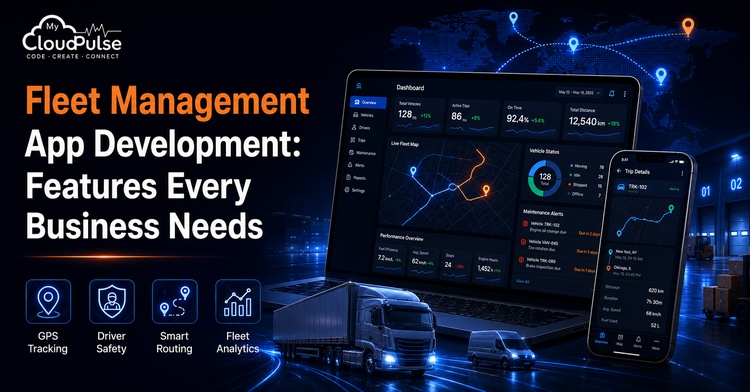
Transportation companies have a lot on their plates, juggling customer commitments, drivers, routes, fuel, maintenance, and safety. As the fleet expands, spreadsheets and standalone tools lose their reliability due to their inability to offer real-time operational visibility and adapt automatically to changing conditions.
Fleet management app development provides a unified platform for mobile- and web-based data collection, analysis, and decision-making about vehicles and drivers. Digital papers, management reports, safety monitoring, digital documents, telematics, GPS tracking, maintenance processes, maintenance tracking, driver communication, and fuel analytics are all components of a modern solution.
A map with icons for moving vehicles is not the most successful product. A functional system crafted with the company’s fleet model, service promises, regulations, integrations, and expansion strategies in mind.
Fleet Management App Market Statistics
As more and more businesses use technologies like automatic compliance, cloud computing, telematics, linked vehicles, and artificial intelligence, the demand for fleet management software is growing. In 2025, the worldwide fleet management software market was estimated by Fortune Business Insights to be worth USD 10.01 billion, and by 2026, it was projected to reach USD 11.61 billion. The rise from one year to the next is around 16.0%. The same prediction indicates a predicted CAGR of 19.4 percent from 2026 to 2034, with the market reaching USD 47.81 billion by 2034.
| Metric | 2025 | 2026 | 2034 Forecast |
| Global fleet management software market | USD 10.01B | USD 11.61B | USD 47.81B |
Whether a report focuses just on software or also covers mobility services, hardware, consultancy, and connectivity affects the market estimations. Thus, it is important to employ a uniform market definition when making comparisons.
What Is a Fleet Management App?
A fleet management app can help an organisation better track and manage its transportation processes, drivers, vehicles, and equipment. A mobile app for drivers and an administrator dashboard are typical components. Customer tracking pages, portals for maintenance, financial tools, integrations with telematics, and application programming interfaces (APIs) for enterprise systems are all possible additions, depending on the project.
Public transportation, rental automobiles, field service vehicles, construction equipment, ambulances, utility fleets, and delivery fleets are all within the system’s capabilities. The operating model, not a generic feature list, should be the starting point for developing vehicle management software due to this flexibility.
How a Fleet Management App Works
1. Data collection for vehicles and assets
GPS units, OEM connections, OBD-II devices, dashcams, fuel sensors, temperature sensors, and other telematics hardware collect location and operational data.
2. Encrypted data transfer
The devices send events to cloud services through cellular, satellite, Bluetooth, or other supported connections. Offline queues preserve data when connectivity is weak.
3. Evaluation of processing and rules
Backend services handle data validation, trip calculation, geofence event identification, unsafe driving detection, maintenance counter updates, and alert triggers.
4. Mobile workflows and dashboard tools
Fleet managers review costs, maps, exceptions, reports, vehicle condition, and driver performance. Through the mobile app, drivers may access their routes, jobs, documents, and messages.
5. Continuous optimisation
Analysing historical data enables improvements in operating policies, fleet size, safety programmes, route planning, and maintenance schedules.
Essential Functions for Any Fleet Management Software
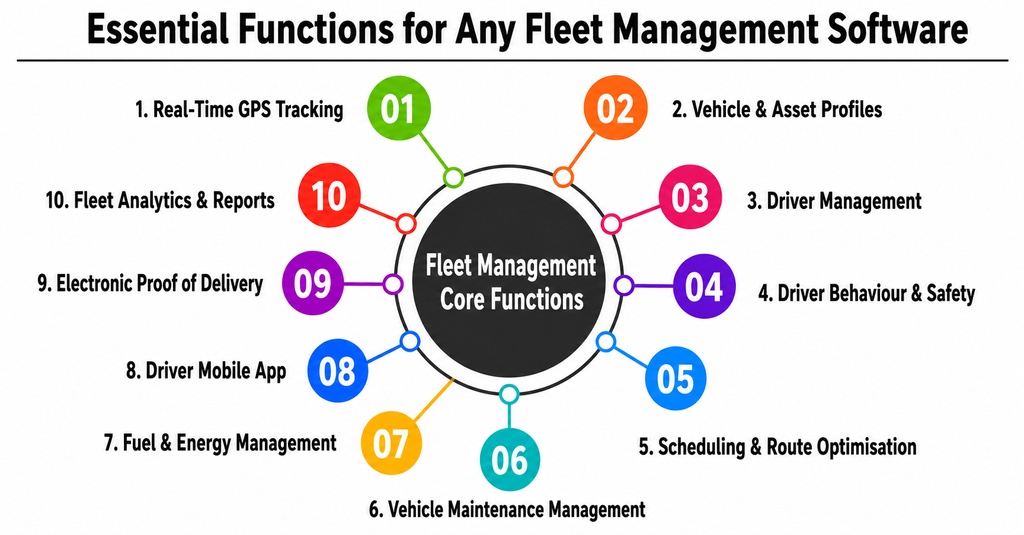
1. Real-Time GPS Tracking
Using an interactive map, the app should display the locations of all active assets and vehicles, along with their current speeds, assigned drivers, route histories, expected arrival times, and most recent reliable updates. Geofencing and trip playback enhance the operational context. Verified tracking provides trustworthy data to customer support teams, helps prevent unauthorised use, and enhances despatch decisions.
2. Vehicle and Asset Profiles
The platform should keep a full record of every vehicle, van, truck, trailer, piece of machinery, and other asset. A profile may include the following details: operating region, capacity, fuel type, insurance, permits, ownership, mileage, maintenance history, assigned devices, and papers. Allocating an overloaded or unapproved vehicle is an example of an incompatible assignment that the system should prevent.
3. Driver Management
Managers require structured driver profiles to keep track of drivers’ licences, certifications, shifts, vehicles, attendance, training, incidents, performance indicators, and document expiration dates. Implementing role-based permissions will keep sensitive information secure while still granting access to the fields needed for employees to perform their jobs.
4. Driver Behaviour and Safety Monitoring
Cameras equipped with artificial intelligence can detect behaviours such as speeding, sudden braking, rapid acceleration, unsafe cornering, not wearing a seatbelt, being distracted, and excessive idling. The app’s primary function should not be disciplinary; instead, it should generate explainable safety events and scorecards, direct coachable incidents to managers, and provide timely feedback to drivers.
5. Scheduling and Route Optimisation
Based on factors such as vehicles’ capacities, drivers’ availability, pickup distance, service areas, traffic, delivery windows, priorities, and present workload, the system should propose efficient routes and distribute tasks accordingly. In the event of a driver cancellation, vehicle failure, or customer schedule change, dispatchers must have the authority to reschedule tasks regardless of recommendations.
6. Management of Vehicle Maintenance
Workflows for preventative maintenance should incorporate data such as time, mileage, engine hours, diagnostic trouble codes, manufacturer schedules, and inspection results. The programme should generate task orders, parts histories, cost records, service reminders, and downtime reports. More sophisticated technologies can detect trends that could point to an impending failure even before it happens.
7. Fuel and Energy Management
The goal of fuel analytics is to establish a connection between driving behaviour, fuel card transactions, idling, route conditions, refill history, and mileage. Monitoring charging status, location, time, range, and battery health may also be necessary for electric fleets. Managers ought to have the capability to compare drivers and vehicles to detect instances of inefficiency, theft, and waste.
8. Driver Mobile Application
Drivers should be able to access their assigned tasks, complete deliveries with the help of a turn-by-turn navigation system, upload documents for inspection, communicate with one another, report incidents, track expenses, and receive emergency assistance through the driver app. Drivers may operate in regions with spotty or no network connectivity; therefore, the ability to work offline is crucial. There shouldn’t be too many unnecessary steps in the interface, and the controls should be big.
9. Electronic Proof of Delivery
Signatures, photos, barcodes or QR scans, the name of the receiver, GPS coordinates, a timestamp, notes, and a one-time password are all possible components of digital proof of delivery. There should be instantaneous data synchronisation with the main system, less paperwork, faster billing, and assistance for support teams in resolving disputes.
10. Fleet Analytics and Reports
Dashboards should translate operational data into clear indicators, including vehicle utilisation, cost per kilometre, fuel efficiency, idle time, maintenance spend, delivery completion, driver safety, asset uptime, and revenue per vehicle. Reports should support filtering, scheduled delivery, and export to formats used by finance and management teams.
Using operational data, dashboards should display unambiguous indicators like revenue per vehicle, asset uptime, fuel efficiency, idle time, maintenance expense, delivery completeness, driver safety, and cost per kilometre. It would be beneficial if reports could be filtered, sent at predetermined times, and exported to formats that the management and finance teams use.
Advanced Features for a Competitive Fleet Platform
1. AI-Powered Dispatch and Route Optimisation
Distance, capacity, due dates, driver hours, past trip times, customer priority, and anticipated demand are some of the factors that AI can use to rank potential assignments. It is important that the recommendation is open and can be reviewed by humans.
2. Predictive Maintenance
Machine-learning algorithms can analyse various factors, including vehicle diagnostic data, mileage, maintenance records, weather, road conditions, and driver behaviour, to determine which vehicles may need an inspection. For the functionality to be useful, sensor data must be accurate, and maintenance personnel must implement the suggestions.
3. Time-Average Forecasts and Exception Handling
To identify shipments that are most likely to fail to meet a service obligation, the system can dynamically recalculate arrival times. Instead of making managers manually monitor every car, it should alert the right person and suggest a course of action.
4. AI Video Safety
Networked cameras can identify potentially dangerous actions, document incidents, and supplement coaching. The usage of video and facial technologies necessitates privacy modes, adjustable retention, permission controls, and transparent employee practices.
5. IoT Cargo and Equipment Monitoring
Some sensors can monitor things like fuel levels, tyre pressure, temperature, humidity, vibration, and the condition of the cargo. Having these skills is crucial for industries that deal with sensitive information, such as healthcare, food distribution, chemicals, and construction.
6. Sustainability and EV Fleet Management
Vehicle appropriateness, energy usage, pollutants, empty mileage, and charging habits are all variables that businesses might monitor. When doing route planning, EV tools can take battery health, charging availability, range, and route needs into account.
7. Digital Fleet Control Tower
From a central location, the system consolidates all relevant operational data into a single view: maps, alerts, vehicle health, capacity, expenses, delays, and customer commitments. Managers can coordinate several locations and concentrate on exceptions without juggling multiple systems.
8. USP and Special Feature
Having all relevant data in one place about cars, drivers, assets, expenses, safety, and operational performance is the main selling point of a fleet management app. It eliminates disjointed communication and delayed reports in favour of regulated workflows and real-time visibility.
One of the best features is an optimisation engine for fleets that takes constraints into account. Vehicle capacity, driver hours, service zones, maintenance status, delivery windows, customer priority, cargo limits, cost, and forecasted conditions are evaluated instead of the nearest driver or shortest route. The system then suggests the task that best considers operational costs, service quality, safety, and utilisation.
Also Read: How to Develop an App Like Lime – Cost and Key Features
Industries That Benefit from Fleet Management Applications
| Industry | Typical Use Cases |
| Logistics and transportation | Dispatch, route optimisation, proof of delivery, carrier coordination, fleet costs |
| E-commerce and last-mile delivery | Order assignment, driver tracking, customer ETAs, delivery performance |
| Construction and mining | Heavy-equipment location, utilisation, maintenance, theft prevention |
| Healthcare and emergency services | Ambulance dispatch, medical supply transport, response-time monitoring |
| Utilities and field services | Technician scheduling, service-zone planning, work-order integration |
| Food and cold-chain distribution | Temperature monitoring, route compliance, delivery evidence |
| Rental and leasing | Vehicle availability, usage history, mileage, maintenance, customer handover |
Fleet Management App Development Process
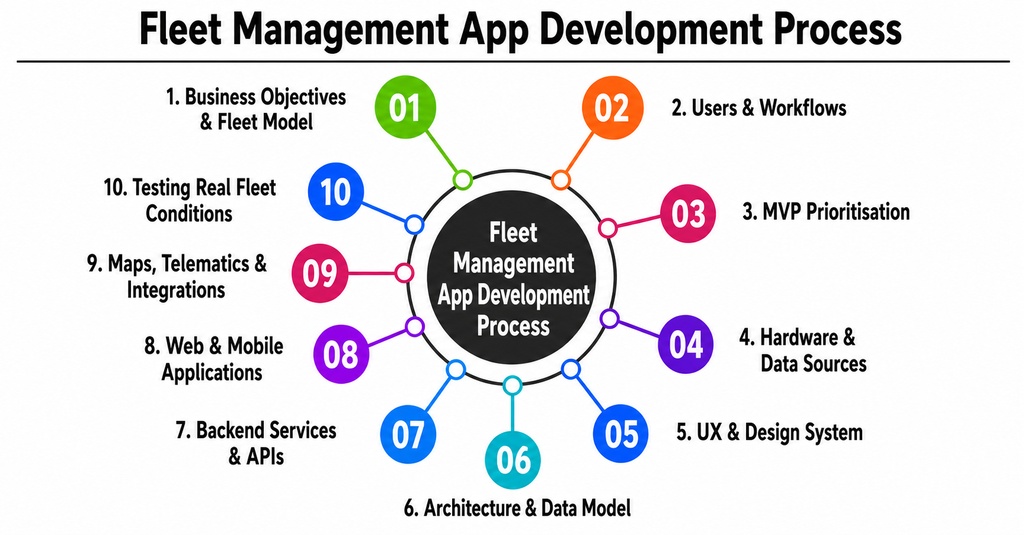
1. Define business objectives and fleet model.
Begin with observable results that are reduced, like less downtime, better on-time deliveries, stronger compliance, or more efficient use of vehicles. Record information about the fleet’s size, assets, ownership, service commitments, regions of operation, and current tools.
2. Map Users and Operational Workflows
Make a list of everyone’s duties: administrators, customers, drivers, maintenance crews, safety managers, and fleet managers. Before creating any screens, make a flowchart of the day-to-day processes, including any exceptions, approvals, communication routes, and information ownership.
3. Prioritise the MVP
Keep launch-critical features apart from those that can wait. Simple reporting, notifications, maintenance reminders, despatch, driver tasks, vehicle and driver records, and GPS monitoring could be a realistic minimum viable product (MVP). Once trustworthy data is available, advanced optimisation, intelligent cameras, and predictive analytics can be implemented.
4. Select Hardware and Data Sources
Determine whether the system will use OEM data, third-party telematics devices, smartphones, OBD-II hardware, dashcams, BLE tags, RFID, or specialist sensors. Confirm supported vehicles, update frequency, installation requirements, warranties, data formats, and connectivity costs.
5. Create the UX and Design System
Design separate experiences for managers and drivers. Fleet dashboards may be information-dense, while a driver app should use clear status indicators, large touch targets, minimal typing, and safe interaction patterns. Prototype the most frequent and highest-risk workflows with actual users.
6. Design Architecture and Data Model
Plan services for users, assets, trips, locations, alerts, maintenance, documents, costs, and reporting. Real-time location events may require queues, caching, time-series storage, geospatial processing, and data-retention policies. The architecture should scale without making every module dependent on one large application.
7. Develop Backend Services and APIs
Build authentication, permissions, fleet records, assignment rules, alerts, maintenance workflows, reports, integrations, and audit logging. APIs should use versioning, validation, idempotency, retries, and monitoring to prevent duplicate jobs or missing events.
8. Build Web and Mobile Applications
Create the management dashboard, driver app, and any customer tracking pages. Implement offline storage, background location rules, push notifications, map interactions, document capture, and accessibility. Platform-specific permissions must be handled carefully on Android and iOS.
9. Integrate Maps, Telematics, and Business Systems
Connect mapping, geocoding, navigation, telematics providers, ERP, WMS, CRM, payroll, fuel cards, and other required services. Define which system owns each record, how frequently it synchronises data, and how it handles conflicts or outages.
10. Test Realistic Fleet Conditions
Perform functional, security, performance, permission, battery, GPS, offline, and integration testing. Simulate location jumps, poor connectivity, duplicated events, driver cancellation, route changes, expired documents, sensor failure, and high volumes of moving vehicles.
Team Required for Fleet Management App Development
A serious project needs both software expertise and fleet-domain knowledge. Smaller teams may combine roles, but ownership of product decisions, architecture, safety, security, and operations must remain clear.
| Role | Primary Responsibility |
| Product owner | Defines goals, priorities, budget, and measurable outcomes. |
| Project manager and business analyst | Coordinate delivery and translate fleet workflows into requirements. |
| Fleet domain expert | Validates despatch, maintenance, driver, compliance, and operational rules. |
| UI/UX designer | Creates manager, driver, and customer experiences. |
| Mobile, frontend, and backend developers | Build applications, services, APIs, real-time data, and integrations. |
| Solution architect and DevOps engineer | Design scalability, cloud environments, deployment, monitoring, and recovery. |
| QA engineers | Test workflows, devices, maps, performance, permissions, and offline behaviour. |
| Security, data, and AI specialists | Support privacy, threat controls, analytics, prediction, and model governance. |
Development Cost and Timeline
The cost depends on fleet size, platforms, hardware, data frequency, integrations, security, AI, reports, and regional development rates. A basic MVP with a management dashboard, driver app, tracking, despatch, alerts, and maintenance may take four to six months. A multi-region enterprise platform with telematics, AI video, predictive maintenance, complex integrations, and compliance workflows may take nine to eighteen months to complete in phased releases.
| Scope | Indicative Timeline | Planning Range (USD) |
| Prototype or proof of concept | 8-12 weeks | $15,000-$35,000 |
| Core fleet MVP | 4-6 months | $40,000-$90,000 |
| Growth-ready platform | 6-10 months | $90,000-$180,000 |
| Enterprise fleet ecosystem | 9-18+ months | $180,000-$400,000+ |
These figures are planning estimates rather than quotations. Ongoing expenses may include cloud hosting, maps, connectivity, telematics hardware, device installation, video storage, support, security updates, and third-party licences.
Monetization Methods for a Fleet Management App
1. Per-Vehicle Subscription
Each active car should be charged a monthly or yearly cost. Both the fleet size and the model’s ease of use are considered. Higher tiers also include advanced reporting, video, compliance tools, and longer data retention.
2. Per-Driver or Per-User Pricing
Companies compensate their dispatchers, managers, administrators, and active drivers differently. While this strategy could work for workforce-centric solutions, it shouldn’t punish clients that want to add view-only users.
3. Various SaaS Packages
Provide three tiers of service, each with its own set of limitations in terms of storage, alerts, analytics, users, integrations, support, and vehicles. So that critical safety functions are not buried by unnecessary and perplexing add-ons, the feature boundaries must be kept explicit.
4. Fees Based on Consumption
Events detected by the GPS, calls to APIs, route computations, communications, video uploads, data storage, and AI processing can all affect the associated fees. Usage pricing better aligns revenue with consumption, but dashboards and spending controls are still required.
5. Acquisition and Setup Costs
The supplier offers installation services in addition to GPS devices, gateways, dashcams, and sensors. The commercial model ought to incorporate hardware warranties, replacements, connectivity, and support.
6. Premium Modules
As add-on modules, you may sell features such as sophisticated route optimisation, business intelligence, compliance, fuel-card integration, AI safety, and predictive maintenance.
7. Enterprise Licensing and Implementation
Large fleets incur a yearly licence fee plus additional costs for migration, integration, training, dedicated environments, service commitments, and ongoing account management.
8. White-Label and Partner Licensing
Telematics providers, logistics firms, car dealers, and consultants can license this platform to use under their own names. Earnings may come from things like setup fees, customisation costs, minimum monthly commitments, and charges per vehicle.
9. API and Data Services
Paid API access, data exports, analytics feeds, and integrated tracking experiences are available to approved customers. Fleet data can expose sensitive operational patterns, so it’s crucial to have strong privacy controls and permissions.
10. Support and Managed Operations
Paid API access, data exports, analytics feeds, and integrated tracking experiences are available to approved customers. Fleet data can expose sensitive operational patterns, so it’s crucial to have strong privacy controls and permissions.
Key Challenges in Fleet Management App Development
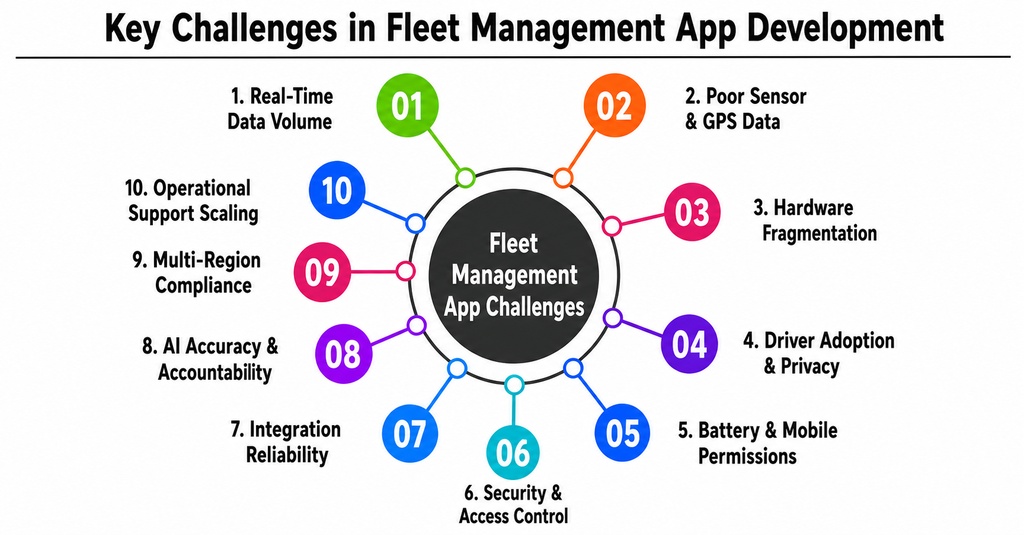
1. Huge Amounts of Real-Time Data
A large fleet generates millions of location and telematics events. The architecture needs to handle them quickly so that maps, warnings, and reports don’t get delayed. Preventing infrastructure costs that aren’t necessary should be a goal of retention policies.
2. Deficient Sensor and GPS Measurements
Missing or inflated readings can be caused by tunnels, weak signals, battery-saving settings, device malfunctions, or sloppy installation. The software should flag impossible jumps, mark stale data, and preserve the last reliable reading.
3. Hardware Fragmentation
Different vehicles, OEM APIs, gateways, and sensors produce inconsistent formats. An abstraction layer is needed so business workflows do not depend directly on one hardware supplier.
Formats can be unpredictable due to differences in sensors, gateways, OEM APIs, and automobiles. Business workflows can’t rely on a single hardware vendor; hence, an abstraction layer is necessary.
4. Driver Adoption and Privacy
Drivers may resist an application that feels intrusive or adds administrative work. Clear policies, privacy modes, minimal data entry, offline capability, and practical benefits such as navigation and faster documentation improve adoption.
5. Battery and Mobile Permissions
Mobile operating systems restrict background location tracking, which can affect battery life. Developers must use appropriate permission flows, update intervals, and fallback behaviours.
6. Security and Access Control
Fleet systems contain locations, personal information, video, documents, and business routes. Encryption, role-based permissions, audit trails, secure device enrolment, and incident response are all essential.
7. Integration Reliability
Maps, ERP, payments, fuel cards, and telematics services may fail temporarily. The platform needs retries, queues, status monitoring, reconciliation, and idempotency to avoid missing or duplicated transactions.
8. AI Accuracy and Accountability
Predictive maintenance, safety detection, and dispatch recommendations can produce false positives. Models require monitoring, explainable outputs, human review, and a process for correcting their decisions.
9. Compliance Across Regions
It is possible for dispatch advice, safety detection, and predictive maintenance to generate false positives. Models necessitate oversight, comprehensible results, human evaluation, and a mechanism for resolving decisions.
10. Enhancing Operational Assistance
The effort in installation, replacement, training, billing, and support increases as the number of devices and consumers increases. The business model must account for these operating expenses, along with software development costs.
Business Benefits
- Greater visibility into vehicles, drivers, equipment, and active jobs.
- Lower fuel, maintenance, administrative, and overtime costs.
- Faster dispatch decisions and more efficient route execution.
- Improved driver safety, coaching, and incident evidence.
- Reduced vehicle downtime through preventive and predictive maintenance.
- More reliable customer ETAs and service communication.
- Stronger compliance records and audit readiness.
- Data-driven decisions on fleet size, replacement, and utilisation.
Conclusion
Developing a fleet management app goes beyond just providing location services. Connecting assets, drivers, vehicles, maintenance, safety, despatch, costs, compliance, and customer commitments through a centralised system is essential for a successful platform.
To start, businesses need to map their actual workflows and define measurable operational goals. It is recommended to prioritise implementing core capabilities such as dependable tracking, despatch, driver tools, maintenance, alarms, proof of delivery, and analytics before adding advanced AI functions. The only way to accurately assess telematics quality, driver adoption, mobile permissions, and integration reliability is in real-world operational situations, which is why a controlled pilot is important.
The unique characteristics of the fleet model determine whether a pre-made solution or bespoke software for managing vehicles is preferred. Standard software may be sufficient for basic tracking and maintenance, while custom development becomes valuable when the organisation has specialised dispatch rules, multiple asset types, complex integrations, regulatory requirements, or a long-term digital product strategy.
Ultimately, the best fleet management tool is the one that employees use consistently, management can trust, and the firm can adjust when cars, locations, customers, and regulations change.
Frequently Asked Questions
Que: 1 What is fleet management app development?
Answer 1: Fleet management app development is the process of designing and building mobile and web software that monitors vehicles, drivers, assets, maintenance, routes, fuel, safety, compliance, and fleet performance. The solution usually combines telematics data, cloud services, a management dashboard, and a driver mobile app.
Que: 2 Which features are essential in a fleet management app?
Answer 2: The essential features include real-time GPS tracking, vehicle and driver profiles, dispatch, route planning, maintenance scheduling, fuel analytics, driver behaviour monitoring, a driver app, alerts, electronic proof of delivery, compliance records, reports, and integrations with existing business systems.
Que: 3 How much does it cost to develop a fleet management app?
Answer 3: A core MVP may cost approximately USD 40,000 to USD 90,000, while a growth-ready or enterprise platform can range from USD 90,000 to USD 400,000 or more. Cost depends on platforms, fleet size, telematics, hardware, integrations, AI, video, security, and regional development rates.
Que: 4 How long does fleet management software development take?
Answer: A basic MVP may take four to six months. A more advanced multi-region platform may require six to eighteen months through phased releases. Hardware selection, telematics integration, data quality, mobile background tracking, and enterprise integrations can significantly affect the schedule.
Que: 5 Why choose custom software development for vehicle management?
Answer 5: Custom development is appropriate when a business has specialised workflows, multiple vehicle types, complex pricing or dispatch rules, unique compliance needs, or integrations that standard products cannot support efficiently. It provides greater control over user experience, data, security, scalability, and the product roadmap.